TL;DR
With email confirmation off, Supabase signs a user in the moment they sign up, with an address nobody has proved they own. On my local stack, sign-up with confirmation off returned a session straight away; with it on, it returned no session and sign-in answered 400 email_not_confirmed until the link was clicked. Anything your app trusts the email for, such as invitations, company domains or password resets, then rests on an address that may belong to someone else. Keep it on in production.
“How to disable Supabase email confirmation” is one of the most common Supabase searches, usually because confirmation emails do not arrive during development. My free Supabase security checker has a rule for the setting, “Email confirmation off”, and this note explains why it is worth the friction.
What does email confirmation do in Supabase?
When it is on, signUp creates the user but does not start a session. Supabase sends a link to the address, and the user can sign in only after clicking it. When it is off, the user is confirmed at once and signUp returns a session. The setting lives in the project’s Auth settings for the email provider; locally it is enable_confirmations under [auth.email] in supabase/config.toml.
What did my test return with it off and on?
On a local Supabase stack (CLI 2.109.1, Auth v2.192.0) I signed up test users with the publishable key, once with confirmation off and once with it on:
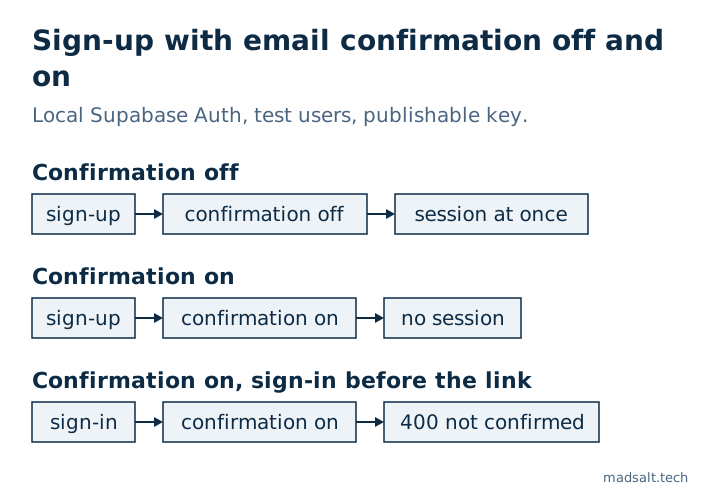
| Step | Confirmation off | Confirmation on |
|---|---|---|
signUp with email and password |
200, session returned |
200, no session |
| Sign in with the same password before clicking the link | works | 400 email_not_confirmed |
So with confirmation off, a working account exists for any address someone types, including an address that belongs to another person.
Why is an unconfirmed address a security problem?
Plenty of app logic treats the email as proof of identity:
- Invitations: a user invited by email is matched to an account by that address. If someone already registered it, they inherit the invitation.
- Company domains: “everyone with @client.com joins the client’s workspace” works only if the address was proved.
- Account squatting: the real owner cannot sign up later, because the address is taken.
- Support and recovery: your team may trust a request because it comes “from” a known address.
Confirmation does not stop a determined attacker, but it closes the easiest path: claiming an address you do not control.
How do you keep sign-up smooth with it on?
- Configure your own SMTP provider. Supabase’s built-in sender is not meant for production: it delivers only to members of the project’s team and currently allows 2 messages per hour, which is the usual reason confirmation emails “do not arrive”.
- Turn it off only in local development, where
config.tomlis separate from production. - Do not write profile data right after
signUp: with confirmation on there is no session yet, so the write runs asanonand quietly does nothing. Pass the fields insignUp({ options: { data } })and let a trigger copy them, treating them as untrusted. That trap is in my Lovable app security checklist.
The other Auth settings that live only in the hosted project, not in your repo, from leaked password protection to MFA, are covered in is Supabase secure.
If you want a person to go through the whole app rather than one setting, I do a Supabase security audit with a keep, fix or rewrite verdict for each part.
My similar case
I applied the migrations of 1,170 public Supabase projects to fresh databases: of the 568 that ran cleanly, 134 (23.6%) had a table with RLS off that the public key could read and change. The method and queries are in the open-source Supabase study.
Not sure your sign-up flow is safe? Write to me and we’ll check your auth settings.
Is your sign-up flow safe?
Tell me what you have now and what you need. I'll reply with the option I'd pick.
Write to me