TL;DR
Supabase Auth records the strength of a session in the token: aal1 after a password, aal2 after a second factor such as TOTP. A login screen that asks for the code protects nothing on its own, because the Data API serves whatever the token allows. Put the requirement in RLS: on my local stack a restrictive policy returned 0 rows to the same user at aal1 and 1 row at aal2. Enable at least one factor, and require aal2 on the tables that need it.
My free Supabase security checker reports “No multi-factor method enabled” when a project has neither TOTP nor phone MFA turned on. Turning it on is half of the job. This note is about the other half.
What do aal1 and aal2 mean in Supabase?
AAL is the authenticator assurance level. When a user signs in with a password, the access token carries "aal": "aal1". After they enroll a factor and verify a code, Supabase Auth issues a new token with "aal": "aal2", and the amr claim lists both methods. RLS can read both claims through auth.jwt().
On a local Supabase stack (CLI 2.109.1, Auth v2.192.0) with TOTP enabled, a test user’s token said aal1 with amr: password after sign-in, and aal2 with amr: totp, password after enrolling a TOTP factor and verifying a code.
Why is the MFA screen in the app not enough?
The second-factor screen runs in the browser. The data comes from the Data API, which checks only the token and your policies. A session at aal1 is a valid session: if no policy asks for aal2, a client that skips the screen and calls the API directly gets the same rows as one that entered the code.
How do you require aal2 in RLS?
Supabase’s RLS guide shows the pattern: a restrictive policy, which must pass in addition to the normal ones. I tested it on a table of private notes with one owner policy and one restrictive policy:
create policy "own notes" on public.private_notes
for select to authenticated
using ((select auth.uid()) = user_id);

create policy "needs aal2" on public.private_notes
as restrictive for select to authenticated
using ((select auth.jwt()->>'aal') = 'aal2');
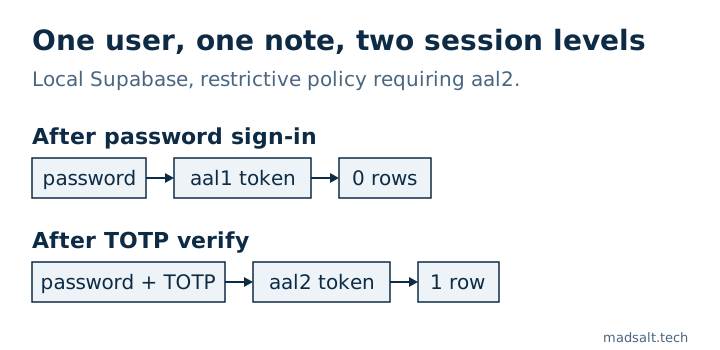
| Same user, own note | Token | Rows returned |
|---|---|---|
| After password sign-in | aal1 |
0 |
| After TOTP verify | aal2 |
1 |
A restrictive policy is the right tool because it cannot be widened by another permissive policy someone adds later.
What should you enable?
- Turn on at least TOTP in the project’s Auth settings; this is what the checker’s rule looks for.
- Decide which data needs
aal2: admin tables, billing, exports, anything a stolen password should not open. Add a restrictive policy per operation there. - Users who enrolled a factor should be asked for it on every new session. Supabase’s
mfa.getAuthenticatorAssuranceLevel()returns the current and the next level, so the app knows when to show the code screen. - MFA does not replace the rest: the per-company checks of your policies still decide which rows a verified user sees. How I test those is in how to test Supabase RLS.
Supabase also limits MFA challenge and verify calls to 15 per minute per IP, per its rate limits guide. Other Auth settings that are easy to leave at their defaults are in Supabase CAPTCHA and Supabase email confirmation off.
If you want a person to go through the whole app rather than one setting, I do a Supabase security audit with a keep, fix or rewrite verdict for each part.
My similar case
Building a time tracker for an audit firm, I found 4 errors no screen showed, including a confidential client leaking through report totals and tag counts. Every access rule now lives in the database and is tested before each deploy; the full story is in the audit firm case.
Need two-factor sign-in done right? Write to me and we’ll set it up and test it.
Need two-factor sign-in done right?
Tell me what you have now and what you need. I'll reply with the option I'd pick.
Write to me