TL;DR
Supabase’s Free plan has no automatic backups. Pro keeps 7 days of daily backups, Team 14, Enterprise up to 30. None of them include files in Storage. On a local stack, my first restore of a supabase db dump failed on a storage table and rolled back to 0 users and 0 orders. Leaving out two vector tables fixed it: 1 user, 3 orders, and the user could sign in. Run a restore before you need one.
My Supabase security checker has a rule for this, “No backups found”. It fires when a project has no backups and no point-in-time recovery, because then a bad migration or a dropped table can’t be undone. A backup you have never restored is only a hope, though, so I ran one too.
What does Supabase back up on each plan?
From Supabase’s backups guide and pricing page, as of 2 November 2026:
| Plan | Daily backups | Point-in-time recovery |
|---|---|---|
| Free | None | Not available |
| Pro | 7 days | Add-on |
| Team | 14 days | Add-on |
| Enterprise | Up to 30 days | Add-on |
So a daily backup can still lose up to a day of data. Point-in-time recovery (PITR) lets you restore to a chosen moment, and the guide puts the worst case at 2 minutes of lost data. It costs about $100 a month per 7 days of retention and needs at least a Small compute add-on. Once it’s on, Supabase stops taking daily backups, because they’d be redundant.
What does a Supabase backup not include?
Two things catch people, both from the same guide:
- Files in Storage. The database holds only their metadata, so restoring an old backup does not bring back a file you deleted.
- Passwords of custom database roles. After a restore from a daily backup, you reset them yourself.
Keep your own copy of anything in Storage that you can’t lose.
What did my restore test show?
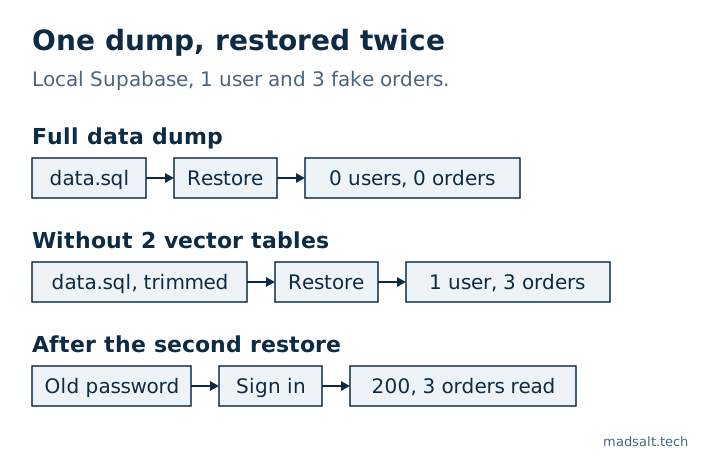
The guide tells Free projects to export with the CLI and keep the copy off-site, so that’s what I tested, on a local stack (CLI 2.109.1, Postgres 17.6) with 1 user, 3 orders and 1 RLS policy. I dumped, wiped the stack with supabase db reset, and restored.
| Dump | Restore result | After it |
|---|---|---|
--data-only |
permission denied for table buckets_vectors |
0 users, 0 orders, 1 policy |
--data-only without the 2 vector tables |
Exit 0 | 1 user, 3 orders, 1 policy |
The dump itself gave no warning. The error appears only when you restore, and since the data load ran in one transaction, everything in it rolled back. After the second restore the user signed in with the old password (200) and read all 3 orders through the Data API, so the policy and the hash both came back.
These are the commands that worked:
supabase db dump --local -f schema.sql
supabase db dump --local -f data.sql --use-copy --data-only \
  -x storage.buckets_vectors -x storage.vector_indexes

psql "$DB_URL" -f schema.sql
psql "$DB_URL" --single-transaction \
  -c 'SET session_replication_role = replica' -f data.sql
I ran these with --local. On a hosted project you’d point supabase db dump at the connection string with --db-url, which I did not run for this note. The failing table may also differ on another CLI version, which is one more reason to test your own dump.
What should you know about the dump file?
The schema dump held the policies and left out the auth tables. The data dump did include auth.users, with the bcrypt password hashes, and session rows. So this file is as sensitive as the database: encrypt it, keep it out of Git, and limit who can read it.
If you use custom roles, also run supabase db dump --role-only. My test had none, so I didn’t exercise that part.
What should you do this week?
- Open Database → Backups and see what you have. On Free, the answer is nothing until you schedule the export.
- Decide how much data you can lose. A day is fine for many small apps. If it isn’t, that’s what PITR is for.
- Restore into a throwaway project and sign in as a real test user. A row count alone doesn’t prove Auth came back.
- Copy your important Storage files somewhere else.
If you hold health data, backups are also a compliance duty, covered in Is Supabase HIPAA compliant?. And a backup is what you compare against after an incident, as in Supabase service role key leaked.
If you want a person to go through the whole app rather than one setting, I do a Supabase security audit with a keep, fix or rewrite verdict for each part.
My similar case
A company I built for was paying thousands of dollars a month for an enterprise document product. Its own platform now costs hundreds a month, with roles for documents, forms, reports and a client portal, and only the features the team uses. See the construction document platform case.
Not sure you could restore your data tomorrow? Write to me and we’ll check your backups.
Could you restore your data tomorrow?
Tell me what you have now and what you need. I'll reply with the option I'd pick.
Write to me