TL;DR
A Lovable app is as safe as its Supabase database, and “RLS is on” proves very little. Test with two users in two companies, keep roles out of user metadata, keep the secret key out of the browser, and check grants, views, storage, functions and rate limits separately, because each one goes around your policies in its own way. Below is the list I run, the prompt you can paste into Lovable or Claude, and eight checks I added after a client’s Lovable app showed me what the first twelve miss.
I’m Denys, a full-stack and AI engineer. This month I fixed a client’s app built with Lovable. Everything ran on Supabase, as usual, and there were so many security fixes it felt like the app was made of them. This is the list I now go through on every Lovable or Supabase project before I call customer data protected.
Is Lovable safe? The security issues so far
The platform builds and hosts your app, but whether the app is safe depends mostly on the Supabase database behind it, because the app reads and writes that database straight from the browser. The public record shows both kinds of problem:
| When | What happened | Source |
|---|---|---|
| March 2025 | CVE-2025-48757: a scan of 1,645 Lovable showcase apps found 303 endpoints in 170 of them that served data to anyone with the public key, because RLS was missing or too loose | Matt Palmer’s disclosure, May 2025 |
| February 2026 | One Lovable-hosted app exposed 18,697 user records; an access check in its functions let anonymous visitors in and blocked signed-in users. Lovable said part of the code was not generated by Lovable | The Register, 27 February 2026 |
| 3 February – 20 April 2026 | A platform regression let other Lovable users read the chat history and source code of public projects | Lovable’s incident post, 22 April 2026 |
The first two are app-level holes, the kind the checks below catch. The third was Lovable’s own and Lovable fixed it; your part is to keep keys out of chats and code (check 3), and to rotate any that were there. Lovable runs a security scan before publishing, but acting on it is up to you, and when the CVE was published that scan checked that a policy existed, not that it was correct. So “is Lovable safe” comes down to whether your database passes the checks below.
Why is “RLS is on” not enough in a Lovable app?
A Lovable app talks to the database straight from the browser. There is no backend of your own in between: the page calls the Supabase Data API with a public key, and Postgres decides what comes back (which schemas that API serves is its own setting, covered in Supabase exposed schemas). So every rule that protects customer data has to live in the database, and the database has several doors.
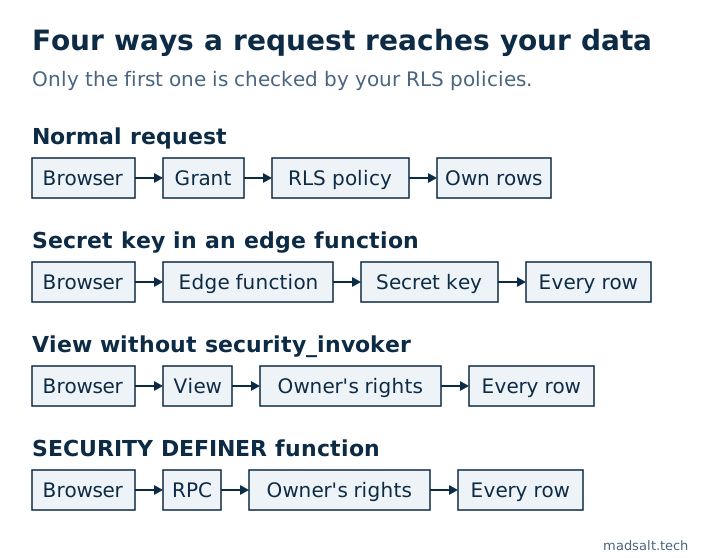
Row level security is one of them. Grants decide whether a role can touch a table at all, policies decide which rows, and three things skip policies entirely: the secret key, views created without security_invoker, and SECURITY DEFINER functions. This is not hypothetical. Lovable’s own security guide asks you to review the RLS policies it sets up, and CVE-2025-48757 above is what happens when nobody does.
The prompt: paste it into Lovable or Claude
You can paste this as is. Then check the result yourself: AI loves to say “done” when it is not, and a prompt that makes an error go away can do it by widening access.
Audit this project for security, fix what you find, tell me what you changed:

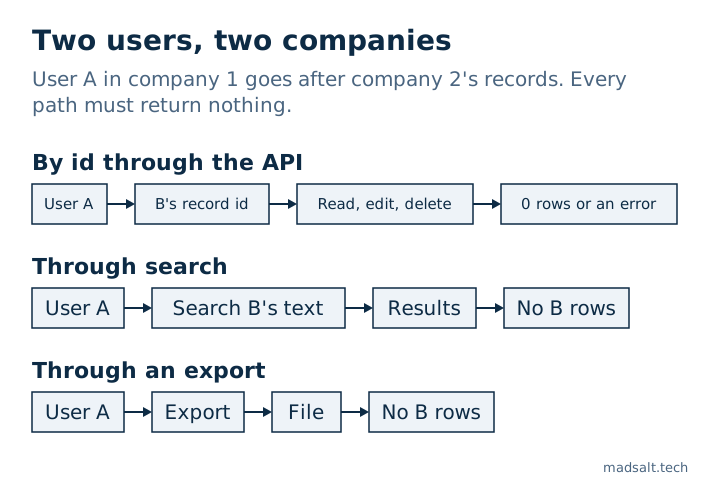
1. Test with two users in two companies. User A tries to read, edit, delete B's records by id, via API, search and exports. All must fail.
2. RLS on every table, policies check the row owner or company. "Logged in" is not enough.
3. Service role key never in frontend. Edge functions using it check the user and filter by company themselves, the key skips RLS.
4. Roles, plan, company id never from user metadata, users can edit it. Keep them in a table only the server writes.
5. When a request sends two ids (project + task), check the task belongs to that project.
6. Revoke all table privileges from anon and authenticated, grant back only what policies need. RLS doesn't stop TRUNCATE. Every migration that creates a table includes its GRANT: from 30 October 2026 Supabase no longer grants new tables automatically, and the app gets error 42501.
7. All views security_invoker = true, otherwise they skip RLS.
8. Storage buckets: users read and write only their own files, no public buckets for private data.
9. SECURITY DEFINER functions: NULL must mean deny, not allow.
10. Rate limits on login, signup, reset, OTP, stored in the DB, not in memory.
11. Validate all input on the server.
12. Run the Supabase security advisor, fix every warning.
The 12 checks, and how to prove each one
1. Two users in two companies
Create user A in company 1 and user B in company 2, each with a few records. Sign in as A and try to read, edit and delete B’s records by id, through the API, through search and through every export. Every attempt must return nothing or an error. This is the one test that catches most of what follows, because it tests what the attacker does, not what you wrote.
Add a third user who belongs to both companies. A policy of the form “the caller is a member of the row’s company” lets that user read company 2’s rows while working in company 1. On another Supabase app my probe on such a user returned the other company’s document until the query also filtered by the company of the request. I wrote that one up as a user in two orgs that RLS did not isolate.
2. RLS on every table, scoped to the owner or company
auth.uid() is not null means “any signed-in user”, which on a public sign-up page means anyone. Each policy compares the row’s owner or company to the caller. List the tables that still have RLS off:
select c.relname
from pg_class c join pg_namespace n on n.oid = c.relnamespace
where n.nspname = 'public' and c.relkind in ('r', 'p') and not c.relrowsecurity;
3. The secret key never in the frontend
The service role key, and the newer sb_secret_ key, bypass every policy. Search the built JavaScript for both, and rotate any key that was ever shipped. Edge functions that use it must check who the user is and filter by company themselves, because with that key nothing else will.
4. Roles, plan and company id never from user metadata
raw_user_meta_data is whatever the client sent to signUp, and users can change it later. On another app the new-user trigger read the invited role from it, so anyone who registered could pass the owner role and become Owner. Keep roles, plans and company ids in a table only the server writes, or in app_metadata. Full story: a role taken from sign-up metadata.
5. Two ids in one request: check that they belong together
When a request carries a project id and a task id, authorizing the project is not enough. A user with rights on project A sends A plus a section id from project B, and the row lands in B. RLS does not catch it, because the insert stamps the attacker’s own project id, which is exactly what the policy checks. Check that the child belongs to the parent before you write.
6. Grants: revoke, then grant back only what is needed
Grants and policies are two separate layers. Adding policies does not take a grant back, which is why Supabase’s RLS guide tells you to revoke and grant back explicitly. On another project the supabase/postgres 17.6.1 image had given anon and authenticated TRUNCATE, REFERENCES, TRIGGER and MAINTAIN on every table in public, and no policy applies to TRUNCATE. The Data API has no TRUNCATE endpoint, so this is not a one-request wipe, but no client role needs it, and any function that runs SQL as that role inherits it.
revoke all on public.orders from anon, authenticated;
grant select, insert, update on public.orders to authenticated;

select grantee, table_name, privilege_type
from information_schema.role_table_grants
where table_schema = 'public' and grantee in ('anon', 'authenticated')
order by table_name;
One date changes this check. Supabase stops granting new tables automatically: new projects since 30 May 2026, and all existing projects from 30 October 2026, including the ones Lovable created. After that, a table that Lovable or a migration creates without an explicit GRANT is invisible to the app: the request fails with 42501 and the feature that uses the table breaks. So every migration that creates a table now carries its grants, next to enable row level security and the policies.
Two things stay the same. Existing tables keep the grants they have, so revoking what you do not need is still your job. And the change takes back only select, insert, update and delete: in the Lovable project, on the new defaults, new tables still came with TRUNCATE, REFERENCES, TRIGGER and MAINTAIN for anon and authenticated. Revoke all first, then grant, is still the safe order.
7. Every view with security_invoker = true
A view runs with its owner’s rights, and in Supabase the owner is usually postgres, so a view over a protected table hands out every row the policies withhold. On Postgres 15 and later:
alter view public.customer_summary set (security_invoker = true);
8. Storage: own files only, no public bucket for private data
A public bucket serves any file to anyone with the URL. Private files go in a private bucket with policies on storage.objects that check the owner or company, usually from the first folder of the path. After moving a project, count the live storage policies: on one app every upload failed after a move because the policy migration never ran and the table had RLS on with zero policies.
9. SECURITY DEFINER functions: NULL means deny
In PL/pgSQL, if not (has_permission or assignee_id = auth.uid()) does not raise when assignee_id is null: the whole condition is null and if skips it. The same expression is safe inside a policy, which treats null as deny. On one app that let a role with every permission off act on all 3683 tasks, because none had an assignee. Wrap the condition in coalesce(…, false). Details: a NULL in a PL/pgSQL IF NOT skipped the check.
10. Rate limits stored in the database
Limit login, sign-up, password reset and OTP, and keep the counter in Postgres. In the Lovable app the limits lived in a variable inside the edge function. I probed the hosted project on 17 October 2026: every request ran in a fresh isolate, so the in-memory counter was always 1 and the limit could never fire. Local supabase functions serve reuses the isolate, so the same code passed every local test.
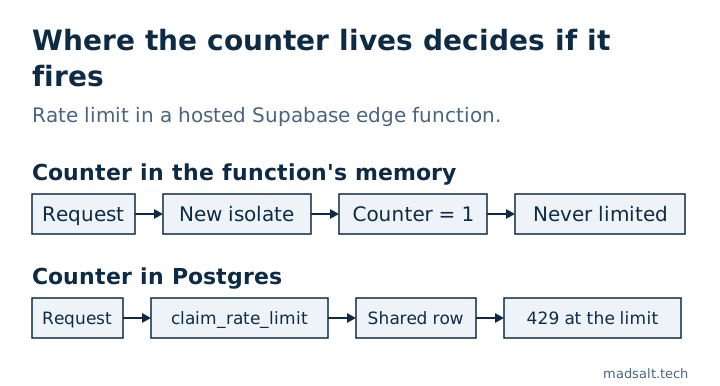
The key matters as much as the store. On the hosted platform the last X-Forwarded-For hop is Supabase’s own proxy, so keying on it puts every caller in one bucket, and x-client-ip is set by the client. In my probe cf-connecting-ip carried the real client. The fix was a SECURITY DEFINER function claim_rate_limit(bucket, key, max, window) that only the service role can execute, serialized with an advisory lock, storing a hash of the IP or user id rather than the raw value.
11. Validate all input on the server
Whatever the form checks, the API accepts anything the client sends. Lengths, formats, enums and ownership are checked in the database (constraints, triggers) or in the edge function, never only in React.
12. The Supabase Security Advisor, every warning
Open Advisors, then Security Advisor, and fix every finding. It flags tables with RLS off, views that skip RLS, policies that read user metadata, permissive using (true) policies and functions with a mutable search_path. It cannot see checks 1, 5, 9 or 10, because those are about logic, not configuration.
What did the Lovable app teach me that the 12 miss?
These came out of the client’s app and its reviews. None of them shows up in a scanner.
- Fields the client must not set. The client sent
status: 'approved'itself, which skipped moderation. An UPDATE policy whosewith checkis looser than itsusingalso lets a user move a row to another owner. A policy cannot compute a value, so aBEFORE INSERT OR UPDATEtrigger re-derivesstatus, role, price and company from the server’s own data and ignores what the client sent. - Every write path, not only the main insert. After the main insert was fixed, the same bypass sat in attachments, comments, restoring a soft-deleted item and counters. List every writer of a protected column before you fix the first one.
- Allow-lists, not deny-lists. Forged records took five review rounds, because each fix blocked one combination and left a sibling open. A trigger that allows only the listed combinations of type and status closed the whole class at once.
- Functions are an API too. Every function in
publicis callable through/rpcby any role with EXECUTE, and RLS does not apply to functions. Give eachSECURITY DEFINERfunctionset search_path = '', revoke EXECUTE frompublic,anonandauthenticated, and grant it only to the role that needs it. - Revoking EXECUTE can break public pages. Postgres checks EXECUTE on every function used by every policy that applies to the role, even in a branch that would never run. Once
anonlost EXECUTE onis_admin(), every anonymous read failed with 42501. Admin-only policies goto authenticated, and public reads get their own policy without the admin branch. - Sign-up with email confirmation on. With confirmation on,
signUpreturns no session, so any profile write right after it runs asanonand silently writes nothing. Lovable projects often have auto-confirm on, which hides the bug. Pass the fields insignUp({ options: { data } }), let the new-user trigger validate and write them, and treat that metadata as untrusted (check 4). - Tests that pass for the wrong reason. The local stack and the hosted project had different default privileges, so “anon cannot insert” passed locally because the grant was missing, not because RLS worked. A negative test means something only when the positive grant exists. Compare
pg_default_acllocally and in production. - The live database, not the migration files. After a migration or a project move, compare what is actually live:
pg_policies,pg_get_functiondeffor each guard, and the grants above. On another app a new migration copied an old function body and quietly undid a later fix.
Is a Lovable app GDPR compliant?
Lovable does not make an app compliant or non-compliant; what the app does with personal data does, and a security review does not answer that. These are the six gaps I check in a Lovable Cloud app, each with the fix:
- List every processor. Lovable Cloud runs the database, auth, storage and functions on Supabase, Lovable hosts the site and can send the sign-in emails, and the Lovable AI Gateway passes text on to a model provider. Add every email, AI or scraping service your functions call. Each one that receives personal data needs a data processing agreement, and one outside the EU also needs a transfer mechanism. The hosting region does not appear in the code, so ask for it.
- Delete a user who has content. Foreign keys from what that user wrote can block the delete, and then an erasure request cannot be completed. Make those keys cascade or set null, add a delete trigger that also removes the user’s email logs and login tokens, and keep a database test that deletes such a user.
- Set a retention limit. Email logs, view tracking, failed-email queues and soft-deleted rows tend to keep personal data with no end date. A scheduled job that hard-deletes soft-deleted rows after a fixed period, and removes their files, closes most of it.
- Make email tracking opt-in. Recording opens and clicks per recipient needs consent under ePrivacy rules: a consent flag, off by default, with the timestamp set by the server, not by the client.
- Keep addresses out of function logs. Edge function logs are not scrubbed, so a
console.logwith a recipient address keeps that address there. Log ids and counts. - Turn email confirmation on. With auto-confirm on, anyone can sign up with an address they do not own and put a real person’s address in the app. Item 6 in the list above covers the sign-up side.
To check your own app: search the functions for API keys to list the services, delete a test user who has content, search the function logs for @, and ask each provider for its data processing agreement. This is not legal advice.
How do you keep it from coming back?
Every check above is a query or a test, so keep them in the repo and run them before each deploy. Supabase’s pgTAP tests cover grants, policies and functions; the two-company test belongs next to them. If your app has roles and a permission screen, a test per policy is not enough either: I prove each permission box against a copy of production, described in how to test Supabase RLS, where 30 of 87 boxes turned out to do nothing. The free Supabase security check runs 45 OWASP Top 10:2025 rules against a project’s roles, grants, policies and auth settings, so use it for the first pass; the two-company test and anything about your UI stay manual.
What this list does not cover: payments and webhooks, secrets in your Git history, security headers on the host, backups. They matter, but they are a different checklist.
If you inherited a Lovable or Supabase app and are not sure which of these it passes, this audit is where a project rescue starts. The audit firm time tracking case shows what the role checks look like on a production app.
Found a hole this list misses?
I'd like to hear it. Happy to compare notes on securing Lovable and Supabase apps.
Get in touch