TL;DR
Supabase supports GDPR-compliant apps and offers a Data Processing Agreement, but it does not make your app compliant. The region you pick holds the Postgres database, Auth, Storage files and backups. Four things work outside it: the Storage CDN cache, Edge Functions unless you pin them, platform logs and support access. If you need the EU, pick Ireland, Paris, Frankfurt or Stockholm, not the general “Europe” option, which can also land in London or Zurich. A region cannot be changed later: moving means a new project and a migration. Lovable Cloud works the same way, and picks the region closest to you unless you choose.
I’m Denys, a full-stack and AI engineer, and most apps I build or fix run on Supabase. European clients ask two questions before anything else: is Supabase GDPR compliant, and where does the data sit? This article answers both from Supabase’s and Lovable’s own documents, read on 29 October 2026, plus the commands I use to check a project.
Is Supabase GDPR compliant?
Supabase’s GDPR guide puts it as a shared responsibility: Supabase secures the infrastructure, and you are responsible for your application’s data processing, consent flows and access controls. In GDPR terms, Supabase is your processor for the data you store, and its Data Processing Addendum is the contract that says so. The same document names Supabase a controller for one category, the usage data it collects to run the platform.
Two parts of that DPA matter in practice:
- Region. When you tell Supabase to process data in a region, it stores and primarily processes it there, unless the law, your own instructions or the service you asked for need otherwise.
- Sub-processors. You authorise Supabase’s sub-processor list in advance, and Supabase gives 30 days’ notice before changing it. You can subscribe to those changes on the same page. The list includes AWS and Cloudflare for hosting, and service providers for support, error monitoring and messages to account users.
Where does Supabase store your data?
The data residency FAQ and the regions page split it like this:
| Part of your project | Where it is processed |
|---|---|
| Postgres database and its backups | The AWS region you picked |
| Auth (users, sessions) | The region you picked |
| Storage files at origin | The region you picked |
| Storage CDN cache | Globally, cached on Cloudflare |
| Edge Functions | At the edge nearest the caller, unless you pin them to a region |
| Platform logs and telemetry | Outside your region; logs are stored in EU data centres |
| Support access | A global support team, when you ask for help or during a security incident, logged |
| Your account and billing data | Supabase’s central systems; Supabase is the controller here |
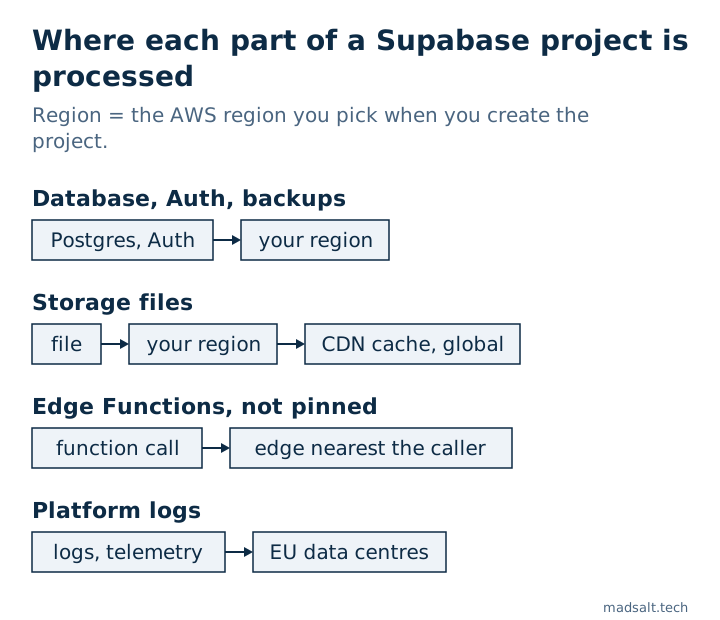
The FAQ answers the blunt question directly: Supabase does not guarantee your data never leaves the region. Your database and backups stay; the four categories at the bottom of the table can leave it.
Which Supabase regions are in the EU?
Four specific regions are inside the EU: West EU (Ireland) eu-west-1, West EU (Paris) eu-west-3, Central EU (Frankfurt) eu-central-1 and North EU (Stockholm) eu-north-1. London eu-west-2 and Zurich eu-central-2 are in Europe and have GDPR adequacy decisions, but they are not EU member states.
That distinction matters when you create the project. The general “Europe” option lets Supabase pick an available European region by capacity, and the regions guide warns that it can be London or Zurich. If your contract or your customer says “data stays in the EU”, pick a specific EU region. One more detail if you rely on regional Edge Functions: the regions page says pinning a function to a region is not available in Ohio or Stockholm.
How do you check your project’s region?
In the dashboard, the region shows in the project’s settings. From a terminal, the Supabase CLI lists every project you can access with its region:
supabase projects list
supabase projects list -o json   # each project has a "region" field, e.g. "eu-west-1"
I ran this on my own account with CLI 2.109.1: every project came back with its AWS region code, so a quick scan shows whether any project sits outside the EU.
Can you change it? No. Supabase’s troubleshooting note says a project is bound to its region at the infrastructure level. Moving means creating a new project in the target region and migrating to it, and then updating your API URL and keys in the app and copying third-party sign-in secrets by hand. A project transfer to another organization does not change the region either.
Is Lovable Cloud GDPR compliant?
A Lovable Cloud app runs its backend on the same model, so the same questions apply, with Lovable’s settings in front. From Lovable’s backend docs, database docs and DPA page:
- The region is one of Americas, Europe or Asia Pacific, chosen when the backend is enabled. A workspace default set by an admin wins (Business and Enterprise plans). Otherwise Lovable uses your own “where project data is stored” setting, and without one, the region closest to you.
- You may never see it. With Enable Cloud set to “Always allow”, Lovable creates the backend in that region without asking. Only “Ask each time” shows the region first.
- It cannot be changed. Lovable says plainly that a project’s region cannot be changed and an existing project cannot be moved.
- Check it under More → Database → Manage → Settings, in the Database location row, for example “Europe (Frankfurt)”.
- The site itself is served globally, whatever the region; the region covers the backend only.
- AI requests are separate. Keeping AI model requests in the EU is a setting called EU inference, on Enterprise workspaces.
- The DPA is included on Business and Enterprise plans.
So if you enabled the backend while working from outside Europe, with no setting of your own, the backend can sit in another region, and with “Always allow” on, Lovable does not ask. Check the Database location row before your first real user signs up.
What the region does not solve
Supabase’s own guide says it: choosing a region is a data-location control and does not make an application GDPR compliant on its own. The gaps I find most often are in the app, not the platform:
- Personal data readable by anyone. A table with RLS off, or a policy that allows every row, serves names and emails to whoever has the public key. The free Supabase security check flags tables without RLS, policies that allow every row and sensitive-looking columns readable by anonymous visitors.
- Accounts created with someone else’s address. With email confirmation off, anyone can sign up with an address they do not own.
- Files in public buckets. A public bucket serves every file to anyone with its URL, and the CDN caches it worldwide.
- Processors you added yourself. Every email, SMS, AI or analytics service your Edge Functions call is your processor, not Supabase’s, and needs its own agreement.
- Deletion and retention. An erasure request fails if foreign keys block deleting a user who wrote content, and logs that keep addresses forever are a retention problem.
I go through the last two, and four more, in the GDPR section of my Lovable app security checklist. For what Supabase certifies beyond GDPR, see is Supabase secure?. This article is not legal advice; your data protection officer or lawyer decides what your processing needs.
Not sure where your app's data sits?
Happy to check the region and the access rules with you. No pitch.
Get in touch