TL;DR
A leaked service role key skips RLS and can use the Auth admin API. In my local test it read 3 of 3 rows under owner-only policies, changed another user’s row and listed every user. Fix the cause of the leak, create a new secret key, move every component to it, retire the old key, then check what changed while it was out. If someone is using the key right now, retire it first and accept the downtime.
My free secret scanner reads the HTML of one public page and the script files it links, looks for API keys, tokens and database URLs that a visitor could copy, including the Supabase service_role key, and shows the values masked. This note is about what to do if the key is out.
When I take over a Supabase app, this key is the first thing I search for in the built JavaScript. The difference between the two keys is in anon key vs service role key. This note is for the bad day, when the secret one turned up in a bundle, a public repo or a log.
What can someone do with the leaked key?
I checked on a local Supabase stack (CLI 2.109.1, Postgres 17.6), on a table with RLS on, owner-only policies and 3 fake orders, plus a test user list.
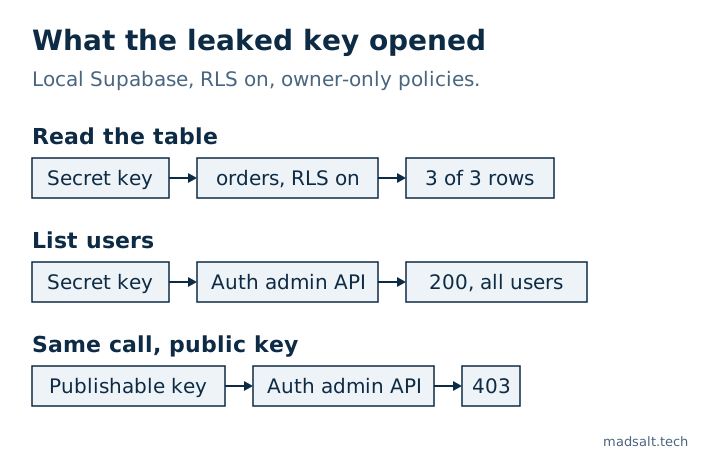
| Request | Publishable key | Secret or service_role key |
|---|---|---|
Read orders |
0 rows | 3 of 3 rows |
| Update someone else’s row | Not tried | 1 row changed |
GET /auth/v1/admin/users |
403 |
200, every user listed |
The legacy service_role key and the new sb_secret_ key behaved the same in all three.
Two results could give false comfort:
- A new table on this stack gave the API roles only
TRUNCATE,REFERENCESandTRIGGER. So the secret key got403with code42501on it until I ran aGRANT. That doesn’t make a leak harmless: the Auth admin call answered200at that same moment. The change behind this is in Supabase 42501 permission denied. - Supabase’s API keys guide says a secret key used from a browser gets
401, and adds that an attacker can still use it from other tools. My local stack answered200to a request with browser headers, so I couldn’t reproduce that block here.
What is the right order to replace the key?
These steps follow Supabase’s guide to rotating a leaked key. I did not run them on a hosted project for this note.
- Fix the cause. Remove the key from the bundle, the repo or the log, or the new key will leak the same way. Deleting it from Git’s latest commit is not enough, because the history still holds it.
- Create a new secret key in Settings → API Keys.
- Replace the old key everywhere: servers, cron jobs, Edge Functions, Database Webhooks and
pg_netcalls. A webhook that sent the legacy key onAuthorization: Bearernow sends the new key on theapikeyheader. - If the leak was the legacy
service_rolekey, also move your clients to a publishable key. Deactivating the legacy keys turns offanonandservice_roletogether, so a client still onanonstops working. - Confirm nothing uses the old key. The API Keys page has last-used indicators for this.
- Retire it. Delete a secret key, which can’t be undone, or deactivate the legacy keys.
- For a legacy key, also revoke the legacy JWT secret, through the JWT signing keys guide. Legacy keys are tokens signed by that secret, so anything that still trusts it can accept the leaked key.
The exception is an attack in progress. Then the guide says to retire the key right away, even though the components using it stop working until you replace it.
If you missed a client after deactivating the legacy keys, move that client to a new key. Turning the legacy keys back on brings the leaked key back too.
How do you check what happened while it was out?
Supabase can’t tell you from the key alone who held it, so look for the results. Start with new or changed accounts:
select email, created_at, last_sign_in_at, raw_app_meta_data
from auth.users
order by created_at desc
limit 50;
Look for accounts you don’t recognise and roles nobody assigned. Then compare your important tables with the last backup from before the leak. If that sentence made you unsure there is one, read Supabase backups. Your users’ personal data may have been readable, so check whether your data protection rules require you to report it.
How do you keep the next leak small?
Use a separate secret key per component, which the API keys guide recommends, so one leak means one rotation. Keep the key out of anything with a NEXT_PUBLIC_ or VITE_ prefix, since those go to the browser. And search each production build for sb_secret_ and service_role before it ships. On a live site, the free secret scanner runs the same search on one public page and the scripts it links.
If you want a person to go through the whole app rather than one setting, I do a Supabase security audit with a keep, fix or rewrite verdict for each part.
My similar case
I applied the migrations of 1,170 public Supabase projects to fresh databases: of the 568 that ran cleanly, 134 (23.6%) had a table with RLS off that the public key could read and change. The method and queries are in the open-source Supabase study.
Worried a key has leaked? Write to me and we’ll rotate it and check what it exposed.
Worried a key has leaked?
Tell me what you have now and what you need. I'll reply with the option I'd pick.
Write to me