TL;DR
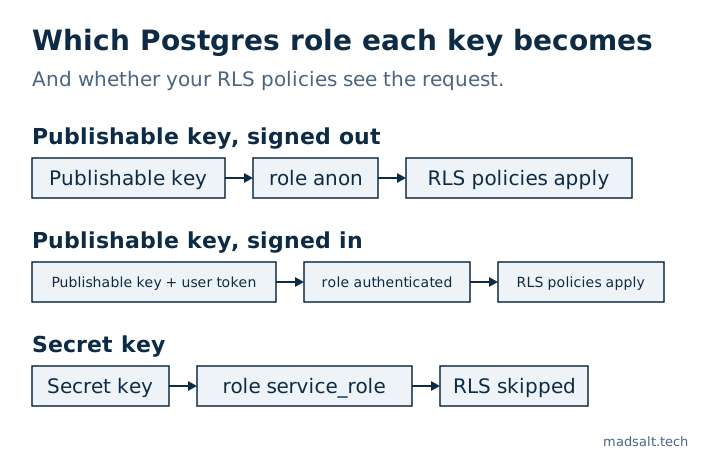
The anon key, now called the publishable key, is meant to be public: it maps to the anon or authenticated role, and your RLS policies decide what it sees. The service role key, now the secret key, maps to service_role, which bypasses RLS entirely. On my local test table with RLS on and no policy, the public key got 0 rows and the secret key got all 3. Put the publishable key in the browser, keep the secret key on a server, and rotate it if it ever shipped.
I’m Denys, a full-stack and AI engineer. A leaked secret key is the first thing I look for when I take over a Supabase app, because with it every other protection is decoration. This article explains what each key opens, with the requests I ran to check it.
What is the Supabase anon key?
The anon key identifies your app, not your user. Every request from a browser or a mobile app carries it, so it has to be public: anyone can read it from the page source. A request with only this key runs as the Postgres role anon. When a user signs in through Supabase Auth, the same key travels with the user’s token and the request runs as authenticated. Your RLS policies are written for those two roles.
Supabase is renaming the keys. The API keys guide calls the new ones publishable (sb_publishable_…) and secret (sb_secret_…), and deprecates the legacy JWT-based anon and service_role keys by the end of 2026. The roles behind them stay the same.
| Key | Legacy name | Postgres role | RLS applies? | Where it goes |
|---|---|---|---|---|
Publishable sb_publishable_… |
anon key |
anon, or authenticated with a user token |
Yes | Browser, mobile app, anything you ship |
Secret sb_secret_… |
service_role key |
service_role |
No, the role has BYPASSRLS |
Server, Edge Function, cron job only |
Is it safe to expose the Supabase anon key?
Yes, if every table, view and function it can reach is protected. The key itself grants nothing special; the grants and policies on your schema decide everything. I checked this on a local Supabase stack (CLI 2.109.1, Postgres 17.6) with one table of three fake orders:
| Table state | Publishable key | Secret key |
|---|---|---|
| RLS off | All 3 rows, and an insert returned 201 Created |
All 3 rows |
| RLS on, no policy | [] |
All 3 rows |
RLS on, policy using (true) |
All 3 rows | All 3 rows |
No grant for anon |
42501 permission denied, with a hint naming the missing GRANT |
All 3 rows |
So the publishable key is exactly as safe as your weakest table. A table without RLS, or with a policy that allows every row, is readable by anyone who opens DevTools. That is the hole behind CVE-2025-48757, where 170 of 1,645 Lovable showcase apps served data to the public key.
What is the service role key, and why is it dangerous?
The secret key is the master key. It runs as service_role, which has the BYPASSRLS attribute, so no policy you write ever applies to it. In the last column of the table above, it read all three rows in every state. Supabase’s guide lists where it belongs: servers that run their own authorization checks, Edge Functions, background jobs and admin tools. Two details from the guide matter in practice:
- The new secret key refuses browser requests: Supabase matches the
User-Agentand returns401. The legacyservice_roleJWT has no such check, so a leaked legacy key works from anywhere. My local stack, which has no such gateway check, answered a script with the secret key with all 3 rows. - A secret key bypasses RLS only when the request carries no user token. With a signed-in user’s token, the request runs under that user’s policies.
An Edge Function that uses the secret key has to check who is calling and filter by owner or company itself, because nothing below it will.
Where do you find the keys?
In the Dashboard, open your project’s Connect dialog for the URL and publishable key, or Settings → API Keys for every key, legacy ones included. Locally, supabase start and supabase status print a publishable key and a secret key. Keep them in environment variables: in Next.js, only the publishable key may carry the NEXT_PUBLIC_ prefix, because the bundler ships anything with that prefix to the browser.
What do you do if the service role key leaked?
Treat it as compromised: every row in every table was readable and writable by whoever found it.
- Create a new secret key, move your servers to it, then delete the leaked one. If the leak was a legacy
service_rolekey, the way out is the move to the new keys: create a publishable and a secret key, switch the app, then disable the legacy keys in Settings → API Keys, where they otherwise stay valid. - Search the built JavaScript and the Git history for
sb_secret_andservice_role. Escape’s scan of 5,600 vibe-coded apps found 400+ exposed secrets, most of them in frontend bundles. - Review what changed while it was out: new users, role changes, deleted rows.
The free Supabase security check does not read your frontend, but it reads the database side of the same problem: roles that bypass RLS, tables with RLS off, policies that allow every row and columns that look sensitive and are readable by anonymous visitors. To check what your public key reaches in practice, the steps are in vibe coding security risks, and the full list I run on an app is in my Lovable app security checklist.