TL;DR
An owner-only rule on users/{uid}/... stopped other users from reading, listing and writing. It did not stop a guest holding the file’s download URL: that request returned 200, and it still did after I fixed the rules. A contentType check accepted an HTML script uploaded as image/png. And a size check on write blocked users from deleting their own files. Replacing the file changed the token and closed the old link.
Storage rules look like Firestore rules, and most guides stop at “check the uid in the path”. I uploaded placeholder files named like passports and invoices to see what that check leaves open.
How I tested. Firebase Local Emulator Suite from Firebase CLI 15.34.2, on 3 November 2026, with the Storage and Auth emulators. I called the Firebase Storage REST API with tokens for a guest, an anonymous user, users A and B, and a stranger who only signed up. Files were a few bytes of placeholder data, plus larger ones for the size tests.
What do the common Storage rules let through?
| Rule | Request | Result |
|---|---|---|
if true (test mode) |
Guest lists the bucket | 200, 4 files |
if true (test mode) |
Guest uploads an HTML file | 200 |
request.auth != null |
Anonymous user reads B’s file | 200 |
request.auth != null |
Stranger lists the bucket | 200, 4 files |
request.auth != null |
Stranger overwrites B’s file | 200 |
request.auth != null |
Stranger deletes A’s file | 204 |
Sign-in-only is the one to watch. A guest gets 403, so it passes a quick look, and then anyone with an account can list every path and replace a passport with anything. The list also hands them each file’s name, which here contains the owner’s uid.
Does an owner-only rule protect the file?
Against other users, yes:
match /users/{uid}/{file=**} {
  allow read, write: if request.auth != null && request.auth.uid == uid;
}
| Request | Result |
|---|---|
| Guest reads B’s file | 403 |
| A reads own file | 200 |
| A reads B’s file | 403 |
| A lists own folder | 200, 1 file |
| A lists B’s folder | 403 |
| A lists the whole bucket | 403 |
| A overwrites B’s file | 403 |
That is the whole of what most tutorials test. The next three sections are what it misses.
Can a download URL bypass Storage rules?
Yes. The URL carries a token in ?token=, and in my run that token was enough on its own. The rule above stayed in place.
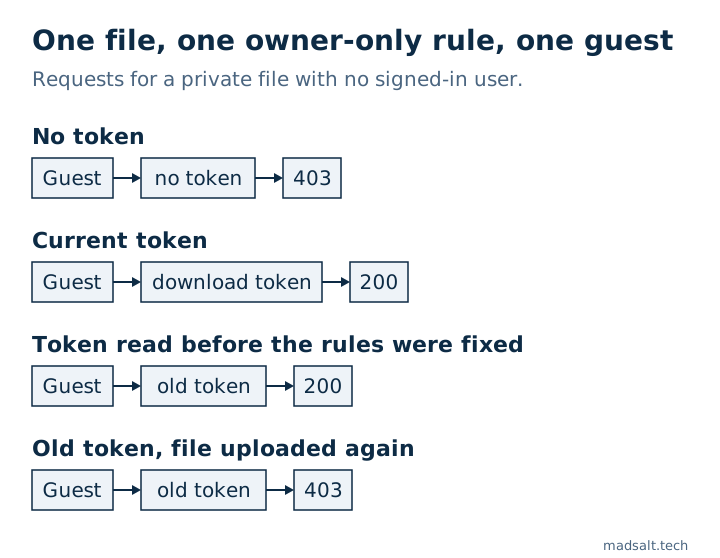
| Request for B’s file | Result |
|---|---|
| Guest, no token | 403 |
| Guest, correct token | 200 |
| Guest, wrong token | 403 |
| A (not the owner), correct token | 200 |
Firebase describes this as a long-lived URL with a revocable token, meant for sharing. The trouble starts when an app saves that URL into a document and treats the document’s rules as the file’s protection. Anyone who ever read the URL keeps the file, whatever your rules later say.
Does fixing the rules close old links?
No, and this is the part I would check after any incident. I ran it in order:
- With
request.auth != nullin place, a stranger read the file’s metadata,200. The metadata contains the download token. - I loaded the owner-only rule. The stranger now got
403on the file and on its metadata. - A guest using the token from step 1 downloaded the file,
200.
So if your bucket was ever open, tightening the rules does not take back the tokens already read. When B uploaded the file again, the response carried a new token, the old one returned 403 and the new one 200. Firebase also says tokens can be revoked in the console, which I did not test.
For private files, skip URLs. getBlob() and getBytes() download through the SDK, so your rules apply to each request.
Do size and type checks stop bad uploads?
The owner-only rule alone accepted anything from A inside A’s folder: a 3 MB file and an HTML page with a script, both 200. So I added limits:
match /users/{uid}/{file=**} {
  allow read: if request.auth != null && request.auth.uid == uid;
  allow write: if request.auth != null && request.auth.uid == uid
    && request.resource.size < 1024 * 1024
    && request.resource.contentType.matches('image/.*');
}
| Request by A | Result |
|---|---|
| Small PNG | 200 |
| 2 MB file | 403 |
HTML sent as text/html |
403 |
HTML sent as image/png |
200 |
| Delete own file | 403 |
Two surprises. contentType is what the client says, and the rule never looks inside the file. So treat it as a guard against mistakes, not against someone trying. If an uploaded file matters, check it on a server.
And the user could no longer delete their own files. A delete has no request.resource, so the check hits a null value, the rule errors and the request is denied. The emulator log showed Null value error on that line. Split the operations:
allow read, delete: if request.auth != null && request.auth.uid == uid;
allow create, update: if request.auth != null && request.auth.uid == uid
  && request.resource.size < 1024 * 1024
  && request.resource.contentType.matches('image/.*');
Now the delete returned 204, and the 2 MB file still got 403.
Why does allow read not let me list a folder?
read covers get and list, so I expected a public folder to list. It depended on the wildcard:
Rule on public/ |
Download | List prefix public/ |
|---|---|---|
match /public/{file}, allow read |
200 |
403 |
match /public/{file=**}, allow read |
200 |
200, 2 files |
match /public/{file=**}, allow get |
200 |
403 |
So for public assets, allow get on a recursive match serves the files and refuses to enumerate them. That is what I would use for anything people should reach only by exact link.
How do you limit files to company members?
Storage rules can read Firestore, using firestore.exists() and firestore.get():
match /companies/{cid}/{file=**} {
  allow read, write: if request.auth != null
    && firestore.exists(/databases/(default)/documents/companies/$(cid)/members/$(request.auth.uid));
}
A member got 200, a user outside the company got 403, and so did a guest. That only moves the question to who can write the members collection, which is the self-written role problem again. On a real project, Firebase asks you to enable a permission connecting the two products, and each lookup counts as a Firestore read. I did not test either in the emulator.
How do you check your bucket?
- Search your database and code for saved
firebasestorageURLs pointing at private files. - If the bucket was ever open or sign-in-only, replace or revoke the tokens of anything sensitive. Fixing the rules is not enough.
- Try a second account against the first account’s files, in the emulator or on a test project.
The free Firebase rules checker takes pasted Storage rules. On these rulesets it flagged test mode, sign-in-only writes and public reads. It passed the owner-only rule with no size or type limit, and it cannot see download tokens at all, since neither shows up as an open rule. So a clean result covers the rule text, not the files.
Limits. Local emulator on placeholder files, over REST. I did not test Google Cloud IAM on the bucket, the console’s token revocation, or how a production bucket serves an uploaded HTML file. Production may differ from the emulator in details I did not check.
For the same attacks run on Supabase and Firebase side by side, see Supabase vs Firebase security.
See also: Document management software for small business: 8 priced.
My similar case
A company I built for was paying thousands of dollars a month for an enterprise document product. Its own platform now costs hundreds a month, with roles for documents, forms, reports and a client portal, and only the features the team uses. See the construction document platform case.
Storing files people would not want shared? Write to me and we’ll work out how your app should hand them out.
Storing files people would not want shared?
Tell me what you have now and what you need. I'll reply with the option I'd pick.
Write to me