TL;DR
Both start closed: a new Supabase table answered 401 to a guest until I granted it, and a new Firebase database with deny-all rules answered 403. The difference is how a mistake fails. When user A updated or deleted user B’s data under an owner-only policy, Supabase answered 200 with zero rows and no error; Firebase refused with 403. Firebase, in turn, let A hand an order to B with 200 when the update rule only checked the old owner, where Supabase refused the same move with 403. Opened up (a grant to anon with RLS off, or if true), both gave a guest all three rows and let them delete one. The public key alone opens nothing on either; the rules decide.
I’m Denys, a Forward Deployed Engineer. Most apps I fix run on Supabase or Firebase, and people choosing between them ask which is safer. Feature and pricing comparisons do not answer that, so I sent both the same requests.
How I tested. Supabase through a local stack (CLI 2.109.1, Postgres 17.6) and Firebase through the Local Emulator Suite (firebase-tools 15.35.0, Auth, Firestore and Storage), both on 6 November 2026. Plain REST calls as a guest and as two signed-in users A and B, with made-up data: orders a1 and a2 owned by A, b1 owned by B. Nothing touched a real project.
How do Supabase and Firebase protect data?
Supabase puts the data in Postgres. A grant decides whether the API roles can touch a table at all, and row level security (RLS) policies, written in SQL, decide which rows each request sees and writes. Firebase puts the data in Firestore and Cloud Storage, and security rules, a separate language, decide per path and per request whether a read or write is allowed.
So both have access control, and the question is what each lets you get wrong. For Firebase, Firebase security rules examples covers the rules in depth; for Supabase, Supabase RLS policy examples does.
What does each do with a new project?
| Request | Supabase, new table, nothing granted | Firebase, deny-all rules |
|---|---|---|
| Guest lists the data | 401, permission denied (42501) |
403 |
| Signed-in user lists the data | 403, permission denied (42501) |
403 |
| Collection with no rule for it | not applicable | 403 |
A fresh setup is closed on both. On Supabase that is recent: tables created after 30 October 2026 no longer get Data API grants automatically, and my CLI already behaved that way, so the first request failed on the missing grant, not on a policy. I covered the change in the October 30 grant change. On Firebase, a database created in production mode starts with deny-all rules.
What happens when it is left open?
| Request by a guest | Supabase, grant to anon, RLS off |
Firebase, allow read, write: if true |
|---|---|---|
| List the data | 200, all 3 rows |
200, all 3 documents |
| Add a record | 201 |
200 |
| Delete a record | 200, row deleted |
200, document deleted |
The open states are not the same thing. On Supabase it takes a deliberate grant to anon and RLS left off, the pattern some tutorials and AI tools write to make an error go away. On Firebase it is test mode, which many tutorials start from. The result is identical: anyone with the app’s public identifiers can read and wipe the data. Turning RLS on with no policy closed the Supabase table again (200 with 0 rows for a guest and for A, and 403 on insert).
What happens when a user touches someone else’s data?
This is where the two behave differently. Both had an owner-only rule: Supabase policies on owner_id = auth.uid(), Firebase rules on resource.data.ownerId == request.auth.uid.
| Request by A | Supabase | Firebase |
|---|---|---|
| Lists everything | 200, A’s 2 rows only |
403, the whole-collection query refused |
| Lists with a filter on own id | 200, A’s 2 rows |
200, A’s 2 documents |
| Filters on B’s id | 200, 0 rows |
403 |
| Reads B’s record | 200, 0 rows |
403 |
| Updates B’s record | 200, 0 rows, no error |
403 |
| Deletes B’s record | 200, 0 rows, no error |
403 |
| Creates a record owned by B | 403, row security violation |
403 |
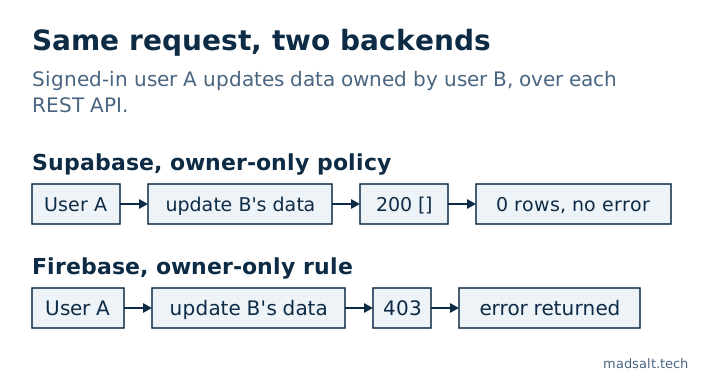
Neither leaked B’s data. The answer is what differs. Supabase filters the rows a policy hides, so a write that matched nothing is a success with zero rows, and an app that reads “no error” as “saved” tells the user their edit worked. Firebase checks the request itself: a query that could return documents the rule denies is refused whole, and a write to someone else’s document is an error the app cannot miss. The price is that every list query on Firebase has to carry the filter the rule expects.
Can a user give their data away or make themselves admin?
| Request by A | Supabase | Firebase |
|---|---|---|
| Change own record’s owner to B, no check on the new value | 403 (an update policy with no check reuses its own filter) |
200, and B then read it with 200 |
| Same, with an explicit check on the new owner | 403 |
403 |
Set own role to admin, self-edit allowed |
200, role is now admin |
200, and A’s read of B’s order went from 403 to 200 |
| Same, after the fix | 403 with a column grant on display_name only; name 200 |
403 with a rule that compares the role |
The owner move shows the different defaults: in Postgres a policy with only a using clause applies it to the new row as well, while a Firebase update rule checks only what you write into it. I wrote it the way many examples do, checking the old owner, and Firebase accepted the new one.
The role case fails the same way on both, and it is the one I see most in generated code: a “users can edit their own profile” rule that includes the role column. Supabase closes it with a column grant or a trigger, Firebase with a rule that compares request.resource.data.role to the stored one.
What does the public key alone allow?
Both products put a public identifier in every client. On Supabase the publishable (anon) key reached the API’s schema listing with 200, which named the two tables I had granted to anon, and the data it returned followed the grants and RLS: 3 rows with RLS off, 0 with RLS on. The secret key returned all 3 rows with RLS on, since service_role skips policies, and it must stay on the server; anon key vs service role key has the details.
On Firebase the public API key let me create an anonymous user in the Auth emulator (200 and an ID token). That is not a hole by itself, since rules still decide what that user sees, but it means “signed in” is not a trust signal when sign-up is open. Rules that only check request.auth != null are open to anyone.
What about file storage?
| Request | Supabase Storage, private bucket | Firebase Storage |
|---|---|---|
| Nothing configured, A reads B’s file | 400 not_found |
403 (deny-all rules) |
| Owner-only rule, A lists B’s folder | 200, 0 files |
403 |
| Owner-only rule, A reads B’s file | 400 not_found |
403 |
| Owner-only rule, A uploads to B | 400, row security violation |
403 |
| Owner-only rule, A uses own folder | list 200, 1 file; read 200; upload 200 |
list 200, 1 file; read 200; write 200 |
| Rule is “any signed-in user” | not tested | A read B’s file, listed all 3 files and overwrote B’s file, all 200 |
The same pattern shows up: Supabase hides what you may not see, so another user’s file looks missing, and Firebase refuses outright. The “any signed-in user” rule is the storage version of the sign-in-only mistake, and it let a stranger overwrite someone’s passport scan. The Firebase details, including download tokens, are in Firebase Storage rules.
Which one is more secure?
Neither is safe or unsafe by default; both started closed. They differ in where a mistake hides:
| Question | Supabase | Firebase |
|---|---|---|
| Where access rules live | SQL grants and policies | Rules language per path |
| A denied cross-user write | 200 with zero rows for update and delete |
403 |
| A list that includes others’ data | Filtered silently | Refused unless the query matches the rule |
| New owner on an update | Checked by default | Only if you write the check |
| What opens everything by mistake | A grant to anon with RLS off |
Test mode or if true |
| Server key | Secret key skips every policy | Admin SDK skips rules |
Firebase’s refusals are louder and its mistakes are rule-shaped: a missing check on the new value, a role field the user can edit. Supabase’s silence on denied writes is the thing to design around, and its mistakes are policy-shaped: RLS off, a policy that is always true. If your team will not read either, neither saves you. If it will, Firebase’s 403 is easier to notice in testing, and Supabase’s SQL can express rules that depend on the data, such as MFA level or company membership. Whichever you pick, test as two users; the method I use is in how to test Supabase RLS. I ran the same comparison against another backend in Appwrite vs Supabase security.
How do you check each one?
The free Supabase security check reads your project read-only and flags tables with RLS off, policies that are always true, write policies for guests and grants that give more than the policies imply. The free Firebase rules checker reads pasted rules without touching your project and flags test mode, sign-in-only access and self-written roles. Neither replaces running the requests above as a guest and as a second user.
Limits. One local Supabase stack and one Firebase emulator run, over REST, on made-up data. The Firebase emulator is not production and I did not test Realtime Database, Firebase App Check (the Emulator Suite does not include it), Supabase Realtime, functions or pricing. Your own rules and policies decide the result.
My similar case
I applied the migrations of 1,170 public Supabase projects to fresh databases: of the 568 that ran cleanly, 134 (23.6%) had a table with RLS off that the public key could read and change. The method and queries are in the open-source Supabase study.
Choosing a backend for an app with private data? Write to me and we’ll work out which one fits and how to lock it down.
Choosing a backend for private data?
Tell me what you have now and what you need. I'll reply with the option I'd pick.
Write to me