TL;DR
Document management software for small business starts at about USD 2.50 per user a month for Zoho WorkDrive and USD 7 for Microsoft 365, where SharePoint is included, and climbs to USD 65 for M-Files. Most real bills are set by three things the price page shows last: the seat minimum, the setup fee and the storage or AI limits. If your team mostly stores and shares files, a suite you already pay for is usually enough. If you file by client, contract or project and need approvals, a dedicated tool earns its price. When neither fits, a platform built around your own folders and rules can cost far less to run: one company I built for stopped paying for modules nobody opened.
I’m Denys, a full-stack and AI engineer. I build internal systems for small firms, including a document platform that moved construction teams off shared spreadsheets and docs. This list is for the owner or office manager who has to pick the tool and pay for it. Prices come from vendor pages and dated comparison sites read in October and November 2026; most are per user a month and net of tax, so check the vendor page on the day you buy.
What should document management software for small business do?
It should replace “which version is the latest, and who has it?” with one place that answers. In practice that means five things:
- Storage and search. Every file in one place, found by name, text inside the file or its tags.
- Version history. The last good copy comes back in a click.
- Permissions. Who can open, edit or share which folder.
- Sharing and signing. Links for clients and suppliers, and e-signature, without email attachments.
- Approvals and retention. A contract is reviewed before it is final, and old records are kept or deleted on a schedule.
Most small firms need the first four on day one. Approvals and retention are where the cheap tools stop and the expensive ones start.
The 8 tools compared
There is no single best document management system for small business: the right pick depends on whether you need plain storage or filing with rules. Prices are list prices per user a month, billed yearly, in USD unless stated.
| Tool | Best for | Price (Nov 2026) | Billing unit |
|---|---|---|---|
| Microsoft SharePoint | teams already on Microsoft 365 | USD 7 (inside Business Basic) | per user |
| Google Drive | simple shared storage, real-time editing | USD 8.40 | per user |
| Dropbox Business | file sync and sharing | USD 15 Standard; USD 24 Advanced | per user |
| Box | external sharing, governance | from USD 5; USD 15 Business | per user, 3-user minimum |
| Zoho WorkDrive | tight budgets, Zoho users | USD 2.50 | per user, 3-user minimum |
| Egnyte | file-server replacement, project files | USD 22 | per user |
| M-Files | filing by client, project or contract | USD 65 Essentials | per seat |
| Folderit | small teams that want a flat price | USD 65 a month for 5 users | per package |
Sources are in each entry below. Microsoft, Google and Zoho prices are according to Techpresso and Capterra, because those vendors’ own pages blocked or hid the figures when I read them.
1. Microsoft SharePoint
SharePoint comes inside Microsoft 365: Business Basic is USD 7 per user a month paid yearly, with version history, permissions and 1 TB of OneDrive per person, according to Techpresso. List prices rose on 1 July 2026 (PandaDoc). It rewards setup effort: nothing is wrong out of the box, but nothing is tidy either.
2. Google Drive
Google’s Workspace plans run USD 8.40, 16.80 and 26.40 per user a month, according to Capterra (September 2026 data). Shared drives and real-time editing are strong. It lacks the approval and retention rules of a dedicated tool.
3. Dropbox Business
Standard is USD 15 per user a month from one person, with 3 TB of team storage; Advanced is USD 24 for three people or more, with 15 TB (Dropbox). Sync is its strength. It is not a workflow engine.
4. Box
Box’s pricing page opens at USD 5 per user a month and has a free 10 GB single-user plan (Box). The Business plan is USD 15 per user with a three-user minimum, according to PickMySoft. Good for sharing with outside parties; the Governance add-on that carries retention and legal holds is extra (Techpresso).
5. Zoho WorkDrive
The cheapest here: from USD 2.50 per user a month billed yearly, with a three-user minimum, according to Techpresso. It makes most sense if you already use Zoho apps.
6. Egnyte
Business is USD 22 per user a month, Enterprise Lite USD 39 and Elite USD 48, all paid annually (Egnyte). It is aimed at regulated or project-heavy firms (Techpresso); content lifecycle management and ransomware detection start at Enterprise Lite.
7. M-Files
M-Files files by what a document is (client, project, contract type) instead of by folder. Essentials is USD 65 per seat a month; Enterprise is by quote (M-Files). It is the most expensive per head on this list, and the only one where filing logic is the product.
8. Folderit
Folderit sells packages, not seats: Mini is USD 65 a month (or USD 581 a year) for 5 users and 150 GB, and Medium is USD 1,165 a year for 10 users and 500 GB, with simple approval workflows (Folderit). Folderit is the vendor of that page, so read it as a vendor source. A flat package is easy to budget until you need user eleven.
What does document storage software for small business cost beyond the headline price?
The price page is rarely the bill. Four costs show up later:
- Seat minimums. Laserfiche’s published tiers need 5 and 25 users, Box 3, Dropbox Advanced 3 (Customer Experience, Dropbox).
- Setup. Advisors on Software Advice report quotes of USD 50 to 100 per user a month and a one-time setup fee of USD 1,500 to 5,000, with a median of USD 4,000 (Software Advice).
- Storage and AI limits. Whether storage is per user or per account, and how much AI processing is included, are among the four things vendors bury below the headline rate (Customer Experience).
- No price at all. DocuWare gives a range of USD 30 to 125 or more per user a month for its cloud and prints no tier prices (Customer Experience). You cannot budget what you cannot read.
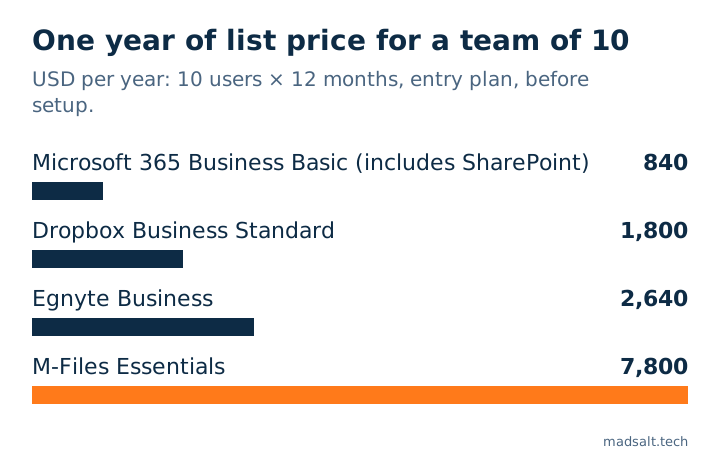
For a ten-person team the arithmetic is simple: price times ten times twelve. Using the published list prices above, that is USD 840 a year on Microsoft 365 Business Basic, USD 1,800 on Dropbox Standard, USD 2,640 on Egnyte Business and USD 7,800 on M-Files Essentials, before setup.
Is there a free option? Box has a free 10 GB plan for one user (Box). Paperless-ngx is open source with no licence cost, but you run and maintain it yourself (myfactory blog). Free is worth it for a person; for a team, the time you spend running it is the price.
Can staff open folders they should not?
In most of these tools, yes, unless you configure it carefully. Vendors describe roles (admin, editor, viewer), and the sensitive cases are the side doors: a search result, a notification email, a shared link or an export that shows a file the folder list hides.
Before you buy, test it. Create a folder only one colleague may see, then sign in as someone else and try search, direct links, notifications and exports. When I built a tracker for an audit firm, a confidential client leaked through report totals and tag counts long after the client list itself was hidden; that story is in time tracking for audit firms: 4 silent errors. The same test finds the same holes in a document tool.
When is a system of your own cheaper than a subscription?
When you pay per seat for a suite you use a third of, or you need rules no product expresses: a document that one role must approve before another sees it, or a contract folder visible to three named people. A custom platform on a managed database has no per-user licence; the running cost is the database plan, and hosting and email often fit in free tiers. The cost moves to the build, so it pays off when your subscription is large and your way of working is stable.
Buy first if you are under five people, your folders are standard, or you need e-signature with legal weight out of the box. Those are years of vendor work to rebuild. If your documents arrive as scanned PDFs and the real job is getting their data out, see turning PDF invoices into Excel.
My similar case
A company I built for was paying thousands of dollars a month for an enterprise document product. Its own platform now costs hundreds a month, and it has exactly the features the team uses, so it stopped paying for modules nobody opened.
The build is in the construction document platform case, and this kind of work falls under internal tools and dashboards.
Tell me what you pay now and what your team actually uses; we’ll work out the best option for you.
Paying for a document product your team half uses?
Tell me what you pay and which features people open. I'll say whether to switch, configure or build.
Write to meLimits of this list
- Prices are list prices read in October and November 2026 from vendor pages and dated comparison sites, per user a month, mostly billed yearly and net of tax. Microsoft’s own page blocked my reader, so its price and Google’s and Zoho’s come from comparison sites. They change often.
- Not tested hands-on. I compared published plans and scope; I did not run each tool with a real team.
- Eight tools, not the market. Several vendors publish no price (DocuWare, ELO, OpenText and others) and are left out of the table.
- The ten-person line is my multiplication of published list prices, without setup, taxes or add-ons.