TL;DR
I sent the same requests against 11 Firestore rulesets as a guest, an anonymous user and three signed-in users. request.auth != null let a stranger read, change and delete everyone’s orders. An owner check on resource alone let a user hand an order to someone else. One broad {document=**} match opened a collection that had a correct owner rule. And a role stored in a document the user can write made them admin in one request. Each one has a fix below, and the fixed rule held against the same requests.
A Firebase app has no server of yours between the browser and the database. The project config ships in the page, and security rules are what stands between anyone holding it and your data. So I wanted examples of rules with the attack next to them, not a list of rules that look right.
How I tested. Firebase Local Emulator Suite from Firebase CLI 15.34.2, on 3 November 2026. I loaded each ruleset, reset the data and called the Firestore REST API with real tokens from the Auth emulator: no token, an anonymous user, users A and B, and a stranger who only signed up. The data was made-up: orders a1 and a2 owned by A, b1 owned by B.
Which Firebase rules leak?
| Rule | Request | Result |
|---|---|---|
if true (test mode) |
Guest lists orders | 200, all 3 |
if true (test mode) |
Guest deletes B’s order | 200 |
request.auth != null |
Anonymous user lists orders | 200, all 3 |
request.auth != null |
Stranger deletes A’s order | 200 |
Owner check on resource only |
A creates an order owned by B | 200 |
Owner check on resource only |
A changes ownerId of own order |
200 |
Owner rule plus {document=**} read |
A reads B’s order | 200 |
User can write their own users doc |
A sets role: admin, reads B’s order |
200 |
What does test mode actually open?
match /{document=**} {
  allow read, write: if true;
}
Everything, to everyone. A guest with no token listed all 3 orders, deleted one and created a new one. Nothing about this needs an account or a leaked secret, only the project id.
The dated version that test mode often uses has a different failure. With if request.time < timestamp.date(2026, 1, 1) and that date in the past, the guest got 403 and so did user A reading their own order. The leak is over, and so is the app.
Is request.auth != null enough?
No. It only says the request has some account behind it.
match /orders/{id} {
  allow read, write: if request.auth != null;
}
The guest got 403, which is why this rule feels safe in a quick test. Then a stranger who had only signed up listed all 3 orders, changed the total on B’s order and deleted A’s order, each with 200. An anonymous user listed all 3 as well. If sign-up is open, this rule means “everyone who bothers to register”. The Firebase docs list it as a common insecure pattern too.
Why does an owner check need both resource and request.resource?
resource is the document as stored. request.resource is the document as it would be after the write. A rule that only looks at the first checks who owns the row now, and says nothing about what they turn it into.
match /orders/{id} {
  allow read, update, delete: if resource.data.ownerId == request.auth.uid;
  allow create: if request.auth != null;
}
Reads looked right: A got 200 on their own order and 403 on B’s. Writes did not. A created a new order with ownerId set to B, and got 200. A then changed ownerId on their own order to B, also 200, and B could read it from then on. In an app where orders mean invoices or balances, that is a user writing into someone else’s account.
This version refused all of it:
match /orders/{id} {
  allow read, delete: if request.auth != null
    && resource.data.ownerId == request.auth.uid;
  allow create: if request.auth != null
    && request.resource.data.ownerId == request.auth.uid;
  allow update: if request.auth != null
    && resource.data.ownerId == request.auth.uid
    && request.resource.data.ownerId == resource.data.ownerId;
}
| Request by A | Result |
|---|---|
| Read own order | 200 |
| Read, update, delete B’s order | 403 |
| Create an order owned by B | 403 |
Change ownerId to B |
403 |
It still let A change the total on their own order, with 200. If the client must not set that field, say which fields it may change:
allow update: if request.auth != null
  && resource.data.ownerId == request.auth.uid
  && request.resource.data.diff(resource.data).affectedKeys().hasOnly(['note']);
With this, changing total returned 403 and changing note returned 200.
Why did my query fail with a correct rule?
Because rules are not filters. Under the owner rule above, A asking for the whole collection got 403, even though A owns 2 of the 3 orders. Firestore judges the query by what it could return, not by what is there.
| Request by A | Result |
|---|---|
| List all orders | 403 |
Query ownerId == A |
200, 2 docs |
Query ownerId == B |
403 |
So when a list breaks after you tighten rules, fix the query. Loosening the rule to make the list work is how the broad rules above get written.
Can a broad match cancel a correct rule?
Yes, and this is the one I would look for first in a project with a long rules file. Firestore allows a request if any matching rule allows it.
match /orders/{id} {
  allow read: if request.auth != null
    && resource.data.ownerId == request.auth.uid;
}
match /{document=**} {
  allow read: if request.auth != null;
}
The first block reads like a good owner rule. With the second block present, A read B’s order with 200, a stranger listed all 3 orders, and the same stranger read A’s document in users. Nothing in the first block warns you. Delete the broad match; there is no way to make a later rule take access back.
How does a user make themself admin?
This pattern comes up whenever roles live in a document:
function isAdmin() {
  return get(/databases/$(database)/documents/users/$(request.auth.uid)).data.role == 'admin';
}
match /users/{uid} {
  allow read, write: if request.auth.uid == uid;
}
match /orders/{id} {
  allow read: if resource.data.ownerId == request.auth.uid || isAdmin();
}
“Users can edit their own profile” and “admins can read all orders” are each reasonable. Together they are a privilege escalation.
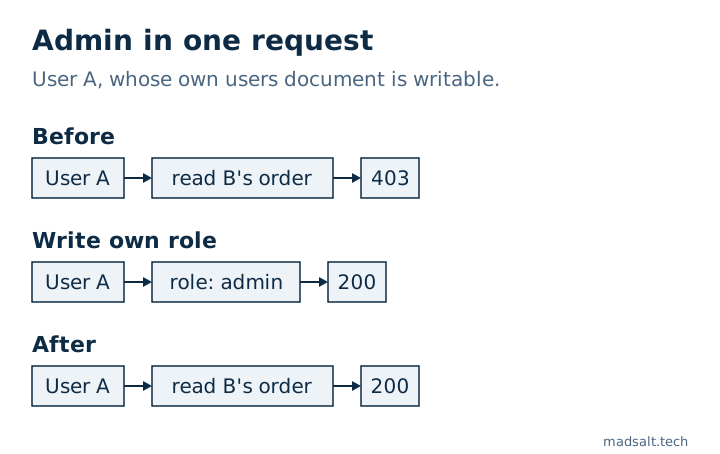
The fix is to stop the client writing that field. With request.resource.data.role == resource.data.role added to the write rule, the same request returned 403 and A stayed out of B’s order. Custom claims set from a server are the other way, since a client cannot change them.
Two things that turned out fine
Rules on a parent do not leak into subcollections. With allow read on /orders/{id} for any signed-in user, A read the order, and /orders/b1/notes/n1 under it returned 403. That is the documented behaviour: rules apply only at the matched path.
A guest does not slip through a comparison with a missing token. resource.data.ownerId == request.auth.uid returned 403 for the guest even without a separate request.auth != null. I still write the check out, because the rule then says what it means.
How do you check your own rules?
Run your requests in the emulator as a guest, as a stranger and as a second user. That is what exposed every case above; reading the rules did not.
For a first pass, the free Firebase rules checker reads pasted rules without touching your project. On the rulesets here it flagged test mode, sign-in-only access, the broad match and the self-written role. It reads text only, so it cannot tell you what your data looks like or whether a rule was deployed.
Your apiKey in the page is not the problem by itself. Firebase web config is public by design, and the free secret scanner marks it that way, because the rules are what protect the data behind it. Files follow different rules again, with a leak rules cannot stop, which I tested in Firebase Storage rules.
Limits. Firestore only, in the local emulator, over REST, on made-up data. The Realtime Database uses another rule language and was not tested. App Check, which limits which apps may call your backend, is not part of this; it does not replace rules. Production may differ from the emulator in details I did not check.