TL;DR
First check whether the PDF has a text layer. If it does, a short script with no AI read all 30 of my test invoices right, header and all 113 line items, in a median of 0.03 seconds each. On a scan the same script returns nothing, and you need a model. In the run I report, Claude Haiku 5.5 read the net, VAT and gross totals right on all 30 scans but misread digits in VAT IDs, invoice numbers and descriptions, and two line amounts: 4 of 30 invoices fully right, 12 if look-alike characters are ignored. The arithmetic checks caught 2 of the 18 wrong invoices. A VAT ID checksum caught 16 of the 18, and 17 of 18 together with the arithmetic checks.
I’m Denys, a full-stack and AI engineer. I wanted to know what works when you extract data from a PDF invoice to Excel, and how often it is wrong. So I ran the job myself, end to end, on 30 fictional supplier invoices like the ones in my earlier test of four AI models: 10 Czech, 10 German, 10 Portuguese, 113 line items in all. Company names carry sample words (Vzor, Muster, Beispiel, Exemplo), every invoice has a SAMPLE footer, and the VAT IDs were checked in the EU’s VIES service, which answered “not valid” for all of them. This one uses PDFs, adds the line items and ends in an Excel workbook.
How do you tell a text PDF from a scan?
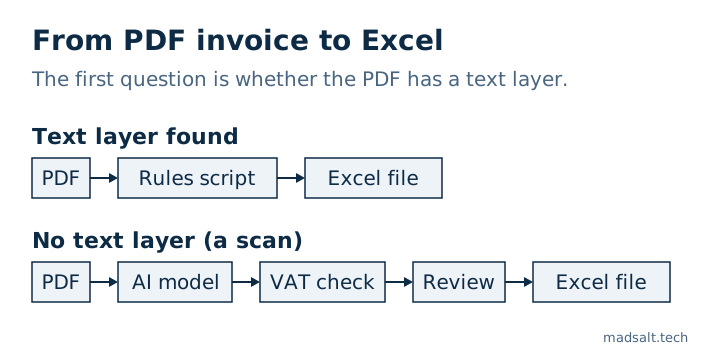
A PDF printed from accounting software contains the text itself, a text layer. A scanned PDF is a picture of a page wrapped in a PDF file, with no text in it. If you can select a word with the mouse, it is a text PDF.
I made both kinds of each invoice, 60 PDFs. All 30 text PDFs had a text layer. From all 30 scans a PDF library extracted 0 characters. The scans are my simulation from the earlier test (rotation, blur, noise, heavy JPEG compression), not paper through a scanner.
Can you get a text PDF into Excel without AI?
Yes. I wrote a Python script with pdfplumber, a free library that reads the text layer: one set of labels per language, VAT IDs found by page half (supplier left, buyer right), and a regular expression per line-item row. It is 94 lines for 3 layouts.
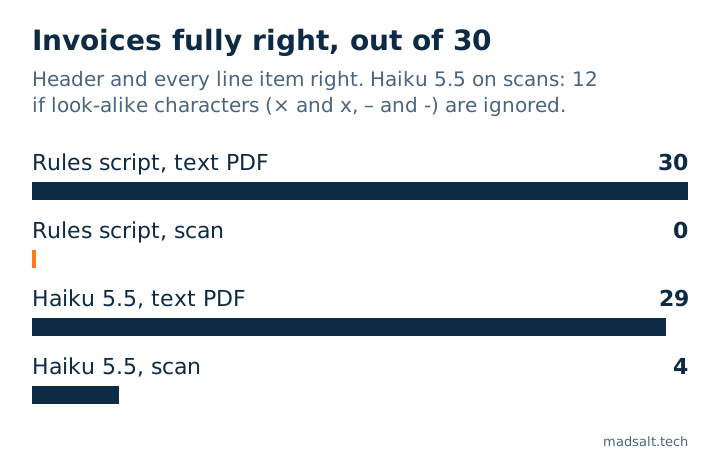
Result on the text PDFs: 30 of 30 invoices fully right, 0 wrong among the 270 header fields, 113 of 113 line items right, a median of 0.03 seconds per invoice and no cost.
The caveat is large. I wrote the rules while looking at these same 30 invoices, so this is the best case for rules. Each new supplier layout needs new rules, and I did not test any other layout. Two things the rules had to handle:
- Reading order. On all 30 invoices, in all three layouts, the buyer’s VAT ID comes before the supplier’s in the text layer, so “take the first VAT ID” swaps them. The script reads the left and right halves of the page separately.
- VAT ID prefix. Portuguese invoices print the ID with or without
PT. I compare without the prefix: 8 invoices differ from the true value only by that.
What happens when the PDF is a scan?
The script fails without a sound. On the 30 scans, extract_text() returned an empty string every time, the call succeeded, and all 270 header fields came back empty. Nothing raised an error.
For scans I sent each PDF to Claude Haiku 5.5 via OpenRouter, which reads the PDF directly with no separate OCR step. Temperature 0, one JSON per invoice: the nine header fields plus the line items (description, quantity, unit price, amount).
| Method and input | Invoices fully right | Line items right |
|---|---|---|
| Script, text PDF | 30 of 30 | 113 of 113 |
| Script, scan | 0 of 30 | 0 of 113 |
| Haiku 5.5, text PDF | 29 of 30 | 112 of 113 |
| Haiku 5.5, scan, exact | 4 of 30 | 76 of 113 |
| Haiku 5.5, scan, look-alikes ignored | 12 of 30 | 108 of 113 |
“Fully right” means the nine header fields and every line item match. On the text PDFs Haiku’s one miss was a description, Europaletten for Europalette; its header was right on 30 of 30. On the scans, 14 of 30 invoices had all nine header fields right.
What did the model get wrong on the scans?
Mostly not the money. Issue date, due date, currency, net, VAT and gross: 0 wrong across all 30 invoices in this run. Quantity, unit price and amount: 111 of 113 right. The errors were mostly text:
- Header: 21 wrong fields in 16 invoices, all in VAT IDs. Supplier VAT ID 6 times, buyer VAT ID 15 times.
- Line items: 37 of 113 not exactly right. 32 differ only by typography:
×returned asx,–as-,µ(micro sign) asμ(Greek mu). 5 are real misreads: 3 descriptions (fita estirávelforfilme estirável, all on one Portuguese invoice) and 2 amounts (184,00read as164,00,1.376,67as1.378,67).
Why did the arithmetic checks stay almost silent?
I put two checks into the workbook as columns: the line items add up to the net total, and net plus VAT equals gross, both within 0.01. On the model’s scans they flagged 2 of the 18 invoices that were really wrong (2 of 26 when typography counts as wrong), the two with a misread line amount. The header amounts were right, so the sums held. A check on numbers cannot see a wrong digit in an ID or a word. The earlier test found the same pattern: its totals check flagged 3 of 63 wrong invoices.
On the empty output of the script, both checks fired for 30 of 30. An extraction that returns nothing at least fails loudly in the spreadsheet.
A third check, a VAT ID checksum (python-stdnum for the Czech DIČ, German USt-IdNr. and Portuguese NIF), caught 16 of the 18 wrong invoices and raised no false alarm on a right one. No wrong VAT ID passed it. Together with the arithmetic checks that is 17 of 18. The one left was a Portuguese invoice where only descriptions were misread, and it needs a person with the PDF open next to the row.
What should the Excel file look like?
Two sheets. Invoices has one row per invoice: file name, invoice number, issue and due date, supplier and buyer VAT ID, currency, net, VAT and gross, line count and line sum, and the three check columns. Lines has one row per line item: file name, invoice number, line number, description, quantity, unit price and amount. The invoice number joins them. One flat row per invoice does not work, because the number of lines varies and my longest invoice has nine.
Numbers go in as numbers and dates as dates. A Czech 175 011,84 Kč or a German 10.465,61 € has to be converted before it is written, or Excel treats it as text and a sum ignores it. I reopened the saved file and checked the type of 2,256 cells: dates, amounts, quantities and the check results all had the right type, and 0 were stored as text. Another 300 cells were empty, the rows where the script found nothing.
I read the file back with a library and did not open it in Excel or LibreOffice, and the checks are TRUE or FALSE values, not formulas.
What does it cost and how long does it take?
The script costs nothing and takes 0.03 seconds per invoice. For Haiku 5.5 I used OpenRouter’s billed cost per call:
| Haiku 5.5 | USD per 1,000 invoices | Median seconds per invoice |
|---|---|---|
| Text PDF | 0.58 | 2.96 |
| Scan | 0.72 | 4.31 |
| Both together | 0.65 | 3.66 |
The whole run was 60 calls and USD 0.038847 (133,197 tokens in, 51,055 out), with no failed call, no retry and no unparseable answer. Times include network and the model’s reasoning, with 8 calls in flight at once.
What moves the scan result?
The same model on the same scans does not give one number. To see what matters I repeated the scan test on this set: only the scans, temperature 0, two repeats per condition, 240 more calls for USD 0.145779. The conditions were the input (the page as an image, or the PDF) and the prompt (the nine header fields, or header plus line items). Invoices with all nine header fields right, out of 30:
| Condition | Run 1 | Run 2 |
|---|---|---|
| Image, header only | 13 | 14 |
| Image, header and lines | 14 | 14 |
| PDF, header only | 13 | 13 |
| PDF, header and lines | 15 | 12 |
The run I report above is a fifth PDF run with header and lines: 14. The four-model image test gave Haiku 14 on these scans as well.
- Input path: no visible effect. Image runs gave 13, 14, 14, 14 and 14 (mean 13.8), PDF runs 13, 13, 15, 12 and 14 (mean 13.4). The ranges overlap almost completely.
- Prompt size: no visible effect. Header only gave 13, 14, 13 and 13; header and lines 14, 14, 15, 12 and 14.
- Run to run: 0 to 3 invoices between repeats of one condition.
- The invoice set is the largest factor. With the same model and the same image prompt, an earlier set of 30 invoices gave 22 and 22. This one gives 13 and 14. Each country has one buyer VAT ID repeated on 10 invoices, and on this set Haiku misreads it on 11 to 13 of 30 invoices per image run (on the earlier set, 2 to 3). One misread string moves up to 10 invoices at once. With two sets and one model, this shows that the set outweighs the other two effects, not why a given string is hard to read.
- Amounts can go wrong. In 4 of the 8 repeat runs at least one amount was wrong. The sum checks flagged 2 of those 4 invoices; 2 stayed silent. The run I report had no wrong header amount, so “mostly not the money” holds there but not in every run.
What did I not test?
- Excel’s own import (Power Query “From PDF”, Data from Picture).
- Real supplier invoices. All 30 are fictional: 3 layouts, one font, one page each.
- Multi-page invoices, other languages, photos and true scanner noise.
- OCR feeding the rules script. The scan baseline is the script alone.
- Any model other than Haiku 5.5.
- Rules on a layout they were not tuned on.
What would I do with real invoices?
This is my reading of the numbers, not a measured result. Check the text layer first. For a few suppliers with text PDFs, rules are cheaper, faster and, in this test, exact. For many or unknown layouts, or scans, use a model, run the VAT ID checksum and the arithmetic checks, and have a person look at what they flag and at the descriptions, which none of my checks covers.
The scripts, the invoices, the truth files, the results and the workbook are in this zip. The 60 PDFs and the raw model answers are inside, so scoring and the workbook rebuild without an API key. My invoice extraction prototype runs on sample data.
If you are still working out which part of your company is worth automating, I help you choose it and then build it: see AI consultant for small business. Customer messages are the other common first job for AI in a small firm: what a WhatsApp AI chatbot costs per reply, with Meta’s fee counted.
See also: Document management software for small business: 8 priced.
My similar case
I built a service that turns a property certificate that took 2–3 weeks and cost EUR 200–300 into one that takes 2–3 minutes and costs EUR 99, with scripts and vision AI. The build is in the property document automation case.
If the invoices should reach your spreadsheet or accounting tool with no one retyping them, I build that under workflow automation.
Moving invoices into a spreadsheet by hand? Write to me and we’ll work out the best option for you.
Still moving invoices by hand?
Tell me what you have now and what you need. I'll reply with the option I'd pick.
Write to me