TL;DR
On Lovable Cloud the database is backed up once a day and the backups are kept for about 14 days. They cover the database only: not the files in storage, not your edge function code, secrets or sign-in settings. A restore replaces the live database and cannot be undone, so there is no rehearsal on a copy. Keep your own copy in three parts: the database export, the storage files and the code in GitHub, stored outside Lovable, and refresh it on a schedule.
I’m Denys, a full-stack and AI engineer. When I take over an app, the first thing I ask is what we can restore and how far back, because every other fix is safer once that answer is known. This is what that answer looks like on Lovable Cloud, from Lovable’s backup docs, read on 6 November 2026.
What does Lovable back up?
| Copy | What it holds | How long, how often |
|---|---|---|
| Daily backup | The database: structure and data | One a day, kept for roughly 14 days |
| Database export (you start it) | The full database, including user accounts and password hashes | One export every 24 hours, database up to 15 GB, file up to 5 GB |
| Storage download (by hand) | Files your app stores | When you download them, from More → Storage |
| Your Git repository | The app’s code, including edge function code and migrations | Every sync, once the project is connected to GitHub |
| None of the above | Secrets, sign-in provider settings, the project’s API keys | You keep them yourself |
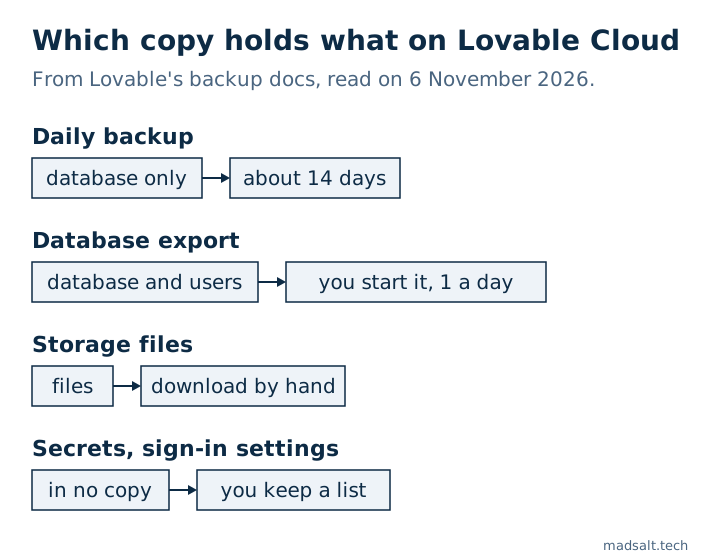
So “Lovable has backups” is true for the database and only for the last two weeks or so. A file a user uploaded and you deleted a month ago is not in any of them, and neither is the API key you pasted into Secrets.
What happens when you restore?
Backups are under More → Database → Manage → Backups. Three details from the docs matter more than they look:
- A restore cannot be undone. Everything written after the chosen backup is gone, and the database is unavailable for a few minutes while it runs.
- The structure goes back too. If you changed tables after that backup, your current code may no longer match the database. Lovable suggests asking it to test the app and fix the mismatch afterwards.
- A restore always replaces the same project’s database. There is no “restore into a copy”, so you cannot try a backup before you need it. Anyone with edit access to the project can press the button.
If you are about to restore, export first. The export is the only way to keep the state you are about to overwrite.
Why keep a copy outside Lovable?
Because the export lives where the problem might be. Lovable saves each export to the project’s own storage and emails you a link; the docs warn that removing the database deletes the export together with the rest of the storage. You can only export while the database is running, so a project paused because the workspace ran out of credits has to be resumed first.
Access is the other reason. In July 2026 a builder on r/vibecoding found their project blocked after it was reported for possible impersonation. Their 12 GB database was on Lovable Cloud, they had no copy of it, and they waited four days until a review found no basis for the block and restored access. Their code was safe because the project was connected to GitHub. Most outages are not like that, but a copy you hold yourself is the one thing that does not depend on anyone else’s queue.
How do you keep your own copy?
Three parts, because no single export holds everything:
- The database. More → Database → Manage → Settings → Export project data → Export data. When the email arrives, download the file from More → Storage and move it off Lovable: an encrypted drive, a private bucket you own. The file is a compressed PostgreSQL archive, read with
pg_restore, and it contains every user’s email and password hash, so treat it like the database itself. - The files. Download the buckets your app uses from More → Storage. A database restore without them gives you rows that point at files that are not there.
- The code. Connect the project to GitHub, so every change lands in a repository you own. The migrations there are the structure of your database as code.
Then write down what none of these hold: the names of your secrets and where each value comes from, the sign-in providers you set up and their redirect URLs, and any external service your functions call. A list in a password manager is enough. When you need it, you will need it fast.
How often? Match it to how much you can lose. Lovable’s own backups already cover the last two weeks of the database, so your copy is for what they miss: anything older, the files, and the case where you cannot get into the project at all. Once a month is a reasonable floor for a small app; once a week once paying customers’ data is in it.
Have you tested that the export restores?
A backup you have never restored is a hope. On a local Supabase stack, my first restore of a plain dump failed on one storage table and rolled back to 0 users; it worked once two tables were left out. That test, with the commands, is in Supabase backups: what each plan keeps. Lovable’s export is a different format, a compressed archive for pg_restore rather than a SQL file, but the same rule applies: restore it once into an empty Supabase project, sign in as a test user, and count your main tables, before the day you need it. What changes when you do that for real, and what does not come across, is in what breaks after you move from Lovable Cloud to Supabase.
What should you do this week?
- Open More → Database → Manage → Backups and check that the latest backup is from today.
- Start an export, download it from More → Storage when the email arrives, and store it outside Lovable.
- Download your storage buckets.
- Connect the project to GitHub if it is not already.
- List your secrets, sign-in providers and external services.
If the database holds customers’ data, this belongs next to the security checks in my Lovable app security checklist, because a leak and a loss end the same way: you explain to your users what happened.
My similar case
A company I built for was paying thousands of dollars a month for an enterprise document product. Its own platform now costs hundreds a month, with roles for documents, forms, reports and a client portal, and only the features the team uses. See the construction document platform case.
Restoring a Lovable export and hitting a wall? Write to me and we’ll get it running on infrastructure you own.
Hit a wall restoring a Lovable export?
Tell me what you have now and what you need. I'll reply with the option I'd pick.
Write to me