TL;DR
On 30 October 2026 Supabase stops giving new tables in public automatic grants for anon, authenticated and service_role on every existing project. Tables you already have keep working. Every table created after that answers 42501 permission denied to supabase-js and to your secret key until a migration grants it. I reproduced the switch locally: new tables, new views and old tables that a migration drops and recreates all fail; existing tables, RPC functions and serial inserts keep working. Check with two SQL queries and one grep below, and fix with a grant, RLS and a policy in the same migration, never with grant all on all tables.
I run a free Supabase security checker that reads the grants on every exposed table, so I wanted to see exactly what this change does before people start hitting it. I took a local Supabase stack, gave it the old defaults, applied the switch the way Supabase describes it, and sent a request to every kind of object I could think of. This post is what came back, and how to check your own project before the 30th.
What changes on 30 October 2026?
Until now, every table created in the public schema got select, insert, update and delete for anon, authenticated and service_role through Postgres default privileges. That is why a new table was reachable from the browser the moment it existed, protected by RLS or not. Supabase’s breaking change notice removes those defaults in three steps:
| Date | What happens |
|---|---|
| 28 April 2026 | New projects can opt out of “Automatically expose new tables” at creation |
| 30 May 2026 | The new behavior becomes the default for new projects, rolled out over a few weeks |
| 30 October 2026 | The new behavior is applied to all existing projects |
On your project the switch is two statements, the same ones Supabase gives for opting in early:
alter default privileges for role postgres in schema public
  revoke select, insert, update, delete on tables from anon, authenticated, service_role;

alter default privileges for role postgres in schema public
  revoke usage, select on sequences from anon, authenticated, service_role;
Default privileges apply only to objects created later. Grants that already exist are not touched, which is why your current tables keep working. What is not affected, per the notice: other schemas (auth, storage, realtime, your own), apps that talk to Postgres over a direct connection (psql, an ORM, a server with a connection string), and RLS itself. The change is about the Data API: REST, GraphQL and every client library on top of it.
What breaks and what keeps working?
My setup: Supabase CLI 2.109.1, Postgres 17.6, PostgREST 14.14, on 26 October 2026. I set auto_expose_new_tables = true in config.toml to get the old defaults, created one table with two rows, RLS on and a read policy, then ran the two statements above. After that I created new objects and called each one with the local public (anon) key and the secret (service_role) key, one request each.
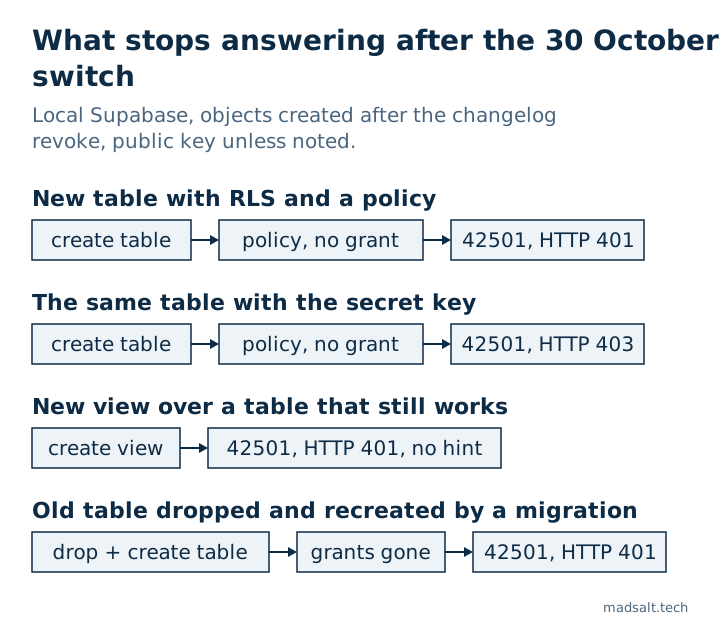
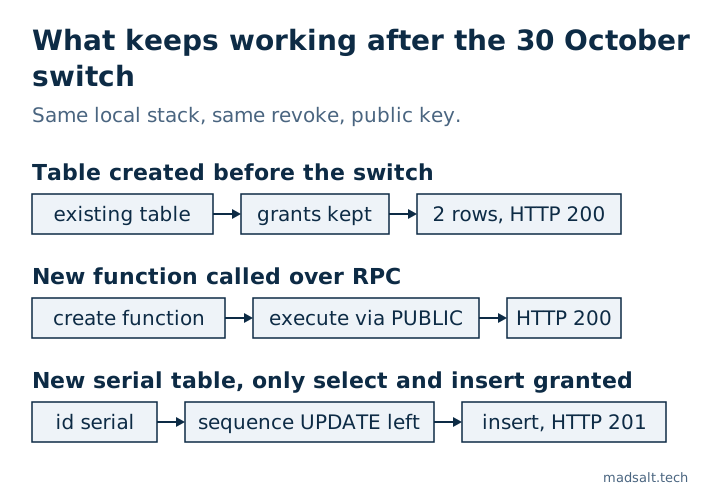
| Object, created after the switch unless noted | Key | Result |
|---|---|---|
| Table created before the switch | public | HTTP 200, 2 rows |
New table with RLS and a to anon, authenticated policy |
public | HTTP 401, 42501, hint GRANT SELECT ON public.new_orders TO anon; |
| The same new table | secret | HTTP 403, 42501, hint … TO service_role; |
New view (security_invoker) over the old table |
public | HTTP 401, 42501, permission denied for view, hint null |
Copy made with create table … (like old_orders including all) |
public | HTTP 401, 42501 |
The old table after drop table and create table again |
public | HTTP 401, 42501 |
New function public.ping() over /rest/v1/rpc |
public | HTTP 200 |
New table with id serial, only select, insert granted to anon |
public | insert HTTP 201 |
Five things in that table are worth knowing before the switch.
“Existing tables keep their grants” holds only while the table exists. A migration that drops and recreates a table, a create table … (like …) copy, or a restore from a dump makes a new table, and a new table gets nothing. The policy came back with my create policy, the grants did not. Anything in your pipeline that rebuilds tables instead of altering them breaks on the first run after the switch.
The secret key breaks too. service_role skips RLS, but it still needs a grant. So an Edge Function, a cron job or a webhook handler that writes to a new table fails with 403, not only the browser. The hint names service_role, which is how you tell it apart.
Views give you no hint. For tables PostgREST returns the exact GRANT you need. For my new view the hint was null and the message said permission denied for view v_old_orders. An AI tool that fixes 42501 from the hint has nothing to copy here; the grant is grant select on public.v_old_orders to authenticated;, and the view should keep security_invoker = true so the table’s RLS still applies.
Functions are not part of this change. The two statements touch tables and sequences. My new function stayed callable by anon, authenticated and service_role, because Postgres grants execute on every new function to PUBLIC and a schema-level revoke can’t remove that, as Supabase’s API security guide explains. RPC calls keep working after 30 October; it also means a new security definer function is callable with your public key the moment it exists.
serial inserts kept working without a sequence grant. A lot of advice says a serial id needs grant usage on sequence … to authenticated after the switch. In my run the insert went through without it: the revoke takes usage and select on new sequences, but update stays, and update is enough for nextval. If you revoke all default privileges on sequences, as the full revoke in the API security guide does, you do need the usage grant. An identity column (generated by default as identity) needs nothing either way.
One more thing the revoke leaves behind: the new table still came with TRUNCATE, REFERENCES and TRIGGER for all three roles, and on Postgres 17 the defaults also carry MAINTAIN. No RLS policy applies to TRUNCATE. I covered that in the 42501 note.
Where you meet it before 30 October
The switch on your hosted project is on the 30th, but three places already behave like after it.
supabase db reset on a current CLI. CLI v2.102.0 added [api] auto_expose_new_tables to config.toml. On 2.109.1, with the key left out, my fresh stack already had the new defaults: tables got only MAINTAIN, REFERENCES, TRIGGER and TRUNCATE, sequences only UPDATE. Setting it to true brings the old grants back and prints api.auto_expose_new_tables is deprecated and will be removed on 2026-10-30. So if your local tables still work after a reset, check that key first. It is also the cheapest place to test: remove it, reset, run your app.
Preview branches and projects created since 30 May. They replay your migrations on the new defaults. Every table whose migration has no grant is unreachable there already. In the GitHub discussion people with one project per customer report exactly this: the running projects are fine, every new deploy from the same migrations is broken.
A baseline migration that brings the old default back. A commenter in the same discussion points out that a first migration made with supabase db pull can contain alter default privileges … grant all on tables to anon, authenticated, service_role. I ran that statement after the switch: the next table I created was reachable again, HTTP 200. Locally that hides the problem. Applied to your hosted project, it quietly undoes the change and every future table is open to the public key again, whether it has RLS or not. Search your migrations for alter default privileges and read every hit.
How to check your project before 30 October
Four checks, from fastest to most thorough. The first two run in the SQL Editor of the hosted project.
1. Has your project switched yet?
This is the query from Supabase’s API security guide. It lists what new objects created by postgres in public will get:
select
  case d.defaclobjtype
    when 'r' then 'tables'
    when 'S' then 'sequences'
    when 'f' then 'functions'
  end as object_type,
  a.grantee::regrole as role,
  string_agg(a.privilege_type, ', ' order by a.privilege_type) as privileges
from pg_default_acl d
cross join lateral aclexplode(d.defaclacl) a
where d.defaclrole = 'postgres'::regrole
  and d.defaclnamespace = 'public'::regnamespace
  and a.grantee in ('anon'::regrole, 'authenticated'::regrole, 'service_role'::regrole)
group by 1, 2
order by 1, 2;
If the tables rows contain SELECT, INSERT, UPDATE, DELETE, the project is still on the old default and switches on the 30th. If they show only MAINTAIN, REFERENCES, TRIGGER, TRUNCATE (or no rows), new tables are already closed. You can also see it in the Dashboard under Data API settings, “Automatically expose new tables”.
2. Which tables have a policy but no grant?
A policy for a role that holds no grant for that command never runs: the request fails before RLS. This query lists those pairs. In my lab it found the new table and the recreated old one, and nothing else:
select p.schemaname || '.' || p.tablename as "table", r.role, p.cmd
from pg_policies p
cross join lateral unnest(case when 'public' = any(p.roles) then array['anon', 'authenticated']::name[] else p.roles end) as r(role)
join pg_class c on c.relname = p.tablename
join pg_namespace n on n.oid = c.relnamespace and n.nspname = p.schemaname
where p.schemaname = 'public'
  and r.role in ('anon', 'authenticated')
  and not has_table_privilege(r.role::text, c.oid,
        case p.cmd when 'ALL' then 'SELECT' else p.cmd end)
order by 1, 2, 3;
Run it after every migration, in CI against a fresh db reset or on staging. On a healthy project it returns nothing; after the 30th any row is a table your app can’t reach. It checks table-level grants, so a table opened with column grants only (grant select (id, name) on …) shows up here even though those columns are readable.
3. Which migrations create a table without a grant?
The database only shows tables that exist. A migration you haven’t applied yet is visible only in your repo. This rough grep lists every create table in supabase/migrations with no grant … on for the same name:
for t in $(grep -hioE 'create table( if not exists)? +[a-z0-9_."]+' supabase/migrations/*.sql | awk '{print $NF}' | sort -u); do
  grep -qiF "on $t " supabase/migrations/*.sql || grep -qiF "on table $t " supabase/migrations/*.sql || echo "no grant: $t"
done
It is text matching, not SQL parsing: a grant listing several tables in one statement, or a table named without its schema in one place and with it in another, gives a false hit. Read each line it prints. Tables that only server code reaches over a direct connection need no grant at all.
4. Replay everything on the new defaults
Remove auto_expose_new_tables from config.toml, run supabase db reset, and run your app or its tests against it. That is your project after the 30th, plus a fresh copy of every table, which is the harder case. Supabase also lists affected tables in the Security Advisor and marks Data API exposure in the Table Editor.
How to fix it without opening every table
Write the grant, RLS and the policies in the migration that creates the table, and give each role only what the app uses:
create table public.invoices (
  id bigint generated by default as identity primary key,
  user_id uuid not null default auth.uid(),
  total numeric not null
);

revoke all on table public.invoices from anon, authenticated, service_role;
grant select, insert on table public.invoices to authenticated;
grant select, insert, update, delete on table public.invoices to service_role;

alter table public.invoices enable row level security;

create policy "Owners read their invoices"
on public.invoices for select
to authenticated
using ((select auth.uid()) = user_id);

create policy "Owners add their invoices"
on public.invoices for insert
to authenticated
with check ((select auth.uid()) = user_id);
I ran this block on the same local stack: a signed-in test user inserted a row and read it back (HTTP 201, then 200), the public key without a session got 42501, and check 2 above no longer listed the table. The revoke all first clears the TRUNCATE, TRIGGER and REFERENCES that come with a new table, and it gives the same result on a project that hasn’t switched yet. Grant anon only on data meant for signed-out visitors, and service_role only if server code uses the secret key on this table. How grants and policies fit together across a whole app is in my Lovable app security checklist.
What not to do when the first 42501 arrives:
- Don’t run
grant all on all tables in schema public to anon, authenticated. It puts the old default back for every table at once, including any table where RLS was never enabled, and those become readable by anyone holding your public key. The 42501 note shows why the grant is the first lock and RLS the second. - Don’t re-add
alter default privileges … grant. It is the rollback for the whole change. - Don’t disable RLS to “test” and don’t put the secret key in the frontend. The secret key skips RLS for everyone who opens your bundle; the difference between the keys is in anon key vs service role key.
If an AI tool writes your migrations, add one line to its instructions: “every new table in public gets explicit grants per role, enable row level security and policies in the same migration; never grant on all tables in schema public”. The hint in the error teaches it the grant, never the RLS that belongs with it.
Questions people ask about the change
Will my existing tables stop working on 30 October? No. Default privileges apply to objects created later, and in my run the old table answered HTTP 200 after the switch. The exception is a table your migrations drop and create again.
Do I need to do anything if I never create tables? Not on the 30th. Check the next time you, a teammate or an AI tool adds one, and check any pipeline that creates projects or branches from your migrations.
Does it affect Edge Functions? Yes, if they use supabase-js with the secret key on a new table: service_role needs a grant too. Functions that connect to Postgres directly are not affected.
Does it affect RPC functions, Storage or Auth? Not in this change. New functions stay callable through PUBLIC, and storage and auth are not the public schema.
Can I switch early? Yes. The two statements at the top are the switch; run them on staging first, then production. Existing tables keep their grants, so a running app does not notice, and the next new table tells you at once whether your migrations are ready.
How the checker sees this
The checker connects read-only and reads the grants on every table in your exposed schemas: which tables the public key can write to without a policy, which tables have RLS off, and which default privileges still hand every new table TRUNCATE, REFERENCES or TRIGGER. It can’t see migration files you haven’t applied, so check 3 above stays yours to run. If RLS is the part you’re unsure about, how to test Supabase RLS walks through it, and the exposed schemas note covers schemas other than public, which this change leaves alone.