TL;DR
Both lock a new table by default: Appwrite answered 401 to a guest and to a signed-in user, and Supabase answers 401/403 until you grant the table to the API roles. The difference shows up when a rule is wrong or a request crosses users. On Supabase, an update of another user’s row returned 200 [] and a loose insert policy let a user join another company; on Appwrite, every cross-user attempt in my run came back as 401 or 404, and a user could not grant their row to anyone but themself or everyone. Appwrite server keys carry scopes; a Supabase secret key skips every policy.
I’m Denys, a full-stack and AI engineer. Most apps I build or fix run on Supabase, and clients who are still choosing a backend ask how Appwrite compares on security. Feature lists do not answer that, so I sent both the same requests.
How I tested. Appwrite 2.3.0, self-hosted with Docker on 30 October 2026, through its REST API as a guest, as two signed-in users A and B, and with two server keys. The Supabase side is my run on a local stack (CLI 2.109.1, Postgres 17.6) from 24 October 2026 with the same roles, described in full in Supabase RLS policy examples. Made-up rows on both.
How do Appwrite and Supabase protect data?
Supabase protects tables with Postgres: a grant decides whether the API roles reach a table at all, and row level security policies, written in SQL, decide which rows each request sees and writes. Appwrite stores permissions next to the data: a table has a list of roles allowed to read, create, update or delete, and with row security on each row carries its own list. In the Appwrite permissions docs access is only granted, never denied, and a user needs it at the table level or the row level, not both.
So the question is not which one has access control. Both do. It is what each lets you get wrong.
What does each do with a new table?
| Request | Appwrite, no permissions set | Supabase, RLS on, no grant (24 Oct) |
|---|---|---|
| Guest lists rows | 401 user_unauthorized |
401 permission denied |
| Signed-in user lists rows | 401 user_unauthorized |
403 permission denied |
| Signed-in user adds a row | 401 No permissions provided for action ‘create’ |
not tested |
A fresh table is closed on both. On Supabase that is new: tables created after 30 October 2026 no longer get Data API grants automatically, which I covered in the October 30 grant change.
What happens when a table is open to everyone?
The two “open” settings are not the same thing. In Appwrite I gave the table one permission, read("any"). On Supabase the common open state is RLS off with the default grants still in place.
| Request by a guest | Appwrite, read("any") |
Supabase, RLS off, default grants (24 Oct) |
|---|---|---|
| List rows | 200, both rows |
200, both rows |
| Delete a row | 401 |
200, both rows deleted |
Appwrite’s “public” means read-only unless you also grant write. A Supabase table with RLS off is readable and writable by anyone holding the publishable key, which is why “RLS disabled in public” is the first thing I check.
How do “own rows” work in each?
On Appwrite I turned row security on and gave the table one permission, create("users"). When A created a row without naming permissions, Appwrite set them itself: read, update and delete for user A only. On Supabase the same intent is four policies on (select auth.uid()) = user_id.
| Request | Appwrite (30 Oct) | Supabase (24 Oct) |
|---|---|---|
| Guest lists rows | 200, 0 rows |
401 (no grant to anon) |
| A lists rows | 200, A’s 2 rows |
200, A’s 2 rows |
| A reads B’s row | 404 row_not_found |
not returned in the list |
| A updates B’s row | 401 |
200 [] |
| A deletes B’s row | 401 |
200 [] |
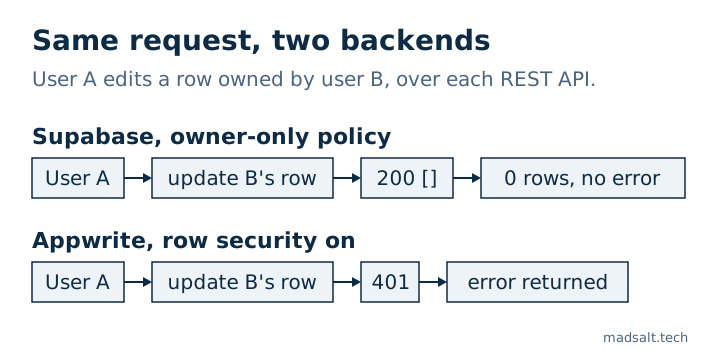
Neither leaked B’s row. The difference is the answer. Supabase filters rows a policy hides, so an update that matched nothing is a success with zero rows; an app that treats “no error” as “saved” tells the user their edit worked. Appwrite refuses with an error the app cannot miss.
Can a user hand their data to someone else?
This is where generated code goes wrong most often, so I tried it on both.
| Request by A | Appwrite | Supabase (24 Oct) |
|---|---|---|
| Create a row readable by user B | 401, Permissions must be one of: any, users, user:A… |
depends on the policy |
| Change own row so B owns it | 401, same message |
403 with a full with check; 200 with with check (true) |
| Create a row readable by everyone | 201, and a guest then listed it |
only if a policy allows it |
Appwrite limits what a user can grant to roles they hold themself: any, users, their own user and their own teams. That blocked the “give my row to someone else” move without any rule from me. It did not stop A from publishing their own row to everyone with read("any"). If a row must never be public, the client should not be the one setting its permissions; create it from a server function instead.
On Supabase the outcome is whatever the policy says. A complete with check refused the move with 403; with check (true), which some generators write, let A move the row into B’s account.
Can a user join someone else’s company?
On Supabase, team access is usually a memberships table plus policies. In my run, the insert policy many tutorials suggest, with check (user_id = auth.uid()), let A add themself to company 2 with 201 Created and then read its payroll project.
Appwrite has teams built in. B created a team; A tried to add themself to it as a member and as an owner. Both requests returned 404 team_not_found: A could not even see the team. Team membership is decided by the server, not by a rule you write, so this particular leak is not available. Rows still need read("team:…") permissions to be shared, and those you set yourself.
What does a server key open?
| Key | Appwrite | Supabase (from my anon vs service role test) |
|---|---|---|
| Full server key | 200, all 4 rows from both users |
all 3 rows, RLS skipped |
Key with a narrow scope (users.read) |
401, missing scope rows.read |
no scoped keys |
A Supabase secret key maps to service_role, which has BYPASSRLS; what it opens is in anon key vs service role key. An Appwrite key also ignores row permissions, but only for the scopes it was created with, so a key for a job that manages users cannot read your tables. Either key in a browser bundle is a full leak of whatever it can reach.
Two smaller findings on Appwrite: a guest and a signed-in user asking for the list of tables both got 401 (the call needs tables.read, which only keys have), and read("users") means any signed-in account, the same trap as auth.uid() is not null on Supabase when sign-up is open.
Which one is more secure?
Neither is safe or unsafe by default; both started closed. They differ in where a mistake can hide:
| Question | Appwrite | Supabase |
|---|---|---|
| Where access rules live | Role lists on tables and rows | SQL grants and policies |
| A cross-user write that is denied | Error (401 / 404) |
200 with zero rows for update and delete |
| Granting rows to others | Only to roles the user holds | Whatever the policy allows |
| Rules on column values, MFA level | Not in permissions; needs server code | In the policy, e.g. aal2 for sensitive rows |
| Server keys | Scoped | Secret key skips all policies |
Appwrite’s model is narrower, and in my run the narrow model refused every cross-user trick without me writing anything. Supabase’s model is SQL, so it can express rules Appwrite permissions cannot, such as “only with MFA” or “only rows of companies I belong to”, and it can also express the wrong rule. If your team will not read the policies, Appwrite’s defaults forgive more. If you need rules that depend on the data, Supabase lets you write them, and then they have to be tested; the method I use is in how to test Supabase RLS.
How do you check a Supabase project?
The free Supabase security check reads your project read-only and flags tables with RLS off, policies that are always true, write policies for guests and grants that give more than the policies imply. What Supabase covers for you and what it leaves to you is in is Supabase secure?. There is no Appwrite equivalent in it; for Appwrite, run the requests above as two users. For Firebase, I ran the same kind of attacks in Firebase security rules examples.
Limits. One self-hosted Appwrite 2.3.0 on a laptop and one local Supabase stack, six days apart, made-up rows. Appwrite Cloud may differ from self-hosted. Storage, functions, realtime, auth settings and compliance certificates are not compared here.
Choosing a backend for an app with private data?
Happy to look at your access model with you. No pitch.
Get in touch