TL;DR
Below are the RLS policies most Supabase apps need, each one run through the REST API as a guest, as the row’s owner and as another signed-in user. Three results are worth knowing before you copy anything: an update on someone else’s row returns 200 with an empty list, not an error; a harmless-looking insert policy on a membership table let a user join another company and read its projects; and writing (select auth.uid()) instead of auth.uid() took one query from 156 ms to 7.4 ms on 200,000 rows.
I’m Denys, a full-stack and AI engineer, and most of the apps I build or fix run on Supabase. Policy snippets are everywhere; what they do when a real request hits them is rarely shown. So I ran them.
How I tested. Most requests went through a local Supabase stack (CLI 2.109.1, Postgres 17.6, PostgREST 14.14, Auth 2.192.0) with the publishable key and two real signed-in users, A and B. Cases that need no HTTP, such as syntax errors and timings, ran on a plain local Postgres 17.10 with Supabase’s anon and authenticated roles and auth.uid() recreated. All on 24 October 2026, with made-up rows.
What is Supabase RLS?
Supabase RLS is Postgres row level security on the tables your app reaches through Supabase’s Data API. A request from the browser runs in Postgres as the anon role (not signed in) or the authenticated role (signed in), and each policy works as an extra WHERE for that role: using filters the rows a command can see, with check validates the rows it writes. Supabase adds helpers such as auth.uid() and auth.jwt() so a policy can compare a row with the signed-in user. The rest is plain Postgres RLS: the same create policy syntax, the same error codes, and a table with RLS on and no matching policy returns no rows.
Before any policy: does the table have a grant?
A policy decides which rows a role sees. A grant decides whether the role reaches the table at all, and on current Supabase projects new tables no longer get Data API grants automatically (from 30 October 2026 for every project). On my stack a table with RLS on and no grant answered:
| Request | Status | Body |
|---|---|---|
Guest GET /invoices |
401 |
permission denied for table invoices, with the GRANT SELECT ... TO anon hint |
User A GET /invoices |
403 |
the same, with the hint for authenticated |
So step one for every table the app reads from the browser:
alter table public.todos enable row level security;
grant select, insert, update, delete on public.todos to authenticated;
Grant only the commands the browser needs, and only to authenticated unless guests must read it.
How do you let users see only their own rows?
One policy per command, each limited to signed-in users:
create policy "read own" on public.todos
  for select to authenticated using ((select auth.uid()) = user_id);
create policy "add own" on public.todos
  for insert to authenticated with check ((select auth.uid()) = user_id);
create policy "edit own" on public.todos
  for update to authenticated
  using ((select auth.uid()) = user_id) with check ((select auth.uid()) = user_id);
create policy "delete own" on public.todos
  for delete to authenticated using ((select auth.uid()) = user_id);
A owns two rows, B owns one. What came back:
| Request by | What | Status | Body |
|---|---|---|---|
| Guest | read all | 401 |
permission denied (no grant for anon) |
| A | read all | 200 |
A’s 2 rows |
| A | insert a row owned by B | 403 |
new row violates row-level security policy |
| A | update B’s row | 200 |
[] |
| A | delete B’s row | 200 |
[] |
| A | change own row’s owner to B | 403 |
new row violates row-level security policy |
The two 200 [] lines are the ones to remember. RLS does not reject an update or delete of rows you cannot see; it filters them out, and zero rows changed is a success. If your app treats “no error” as “saved”, it will tell the user their edit worked when nothing happened. Ask for the changed rows (.select() in supabase-js, Prefer: return=representation over HTTP) and check that one came back.
Why does an update policy need WITH CHECK?
using picks which existing rows a user may touch; with check decides what those rows may look like afterwards. I compared three versions of the same update policy:
| Update policy | A gives own row to B |
|---|---|
using (uid = user_id) with check (uid = user_id) |
403, refused |
using (uid = user_id), no with check |
refused (Postgres reuses using as the check) |
using (uid = user_id) with check (true) |
200, row now belongs to B |
Leaving with check out is safer than it looks, because Postgres falls back to the using expression. with check (true), which some generators write to “allow updates”, is what lets a user move a row into someone else’s account. Write the check out in full.
How do you make profiles public but editable only by their owner?
create policy "public read" on public.profiles
  for select to anon, authenticated using (true);
create policy "own edit" on public.profiles
  for update to authenticated
  using ((select auth.uid()) = id) with check ((select auth.uid()) = id);
On the plain Postgres run: the guest read both profiles, the guest’s update changed 0 rows, and A’s update profiles set display_name = 'x' without a filter changed exactly 1 row, A’s own. using (true) is fine for a select on data that is meant to be public. On any other table it is the same as no RLS, and a policy written without a to clause applies to guests as well: my guest read the “private” row through a using (true) policy that had no to.
How do you share rows inside a team?
The usual shape: a memberships table and a policy on the data that looks a user’s teams up in it.
create policy "members read" on public.projects
  for select to authenticated
  using (org_id in (select org_id from public.memberships
                    where user_id = (select auth.uid())));
That policy is fine. The leak was next to it. I gave memberships the policy many tutorials suggest, “users can insert their own membership”:
create policy "join any org" on public.memberships
  for insert to authenticated with check (user_id = (select auth.uid()));
It checks who the row is for, not which team. A, a member of company 1, sent one request:
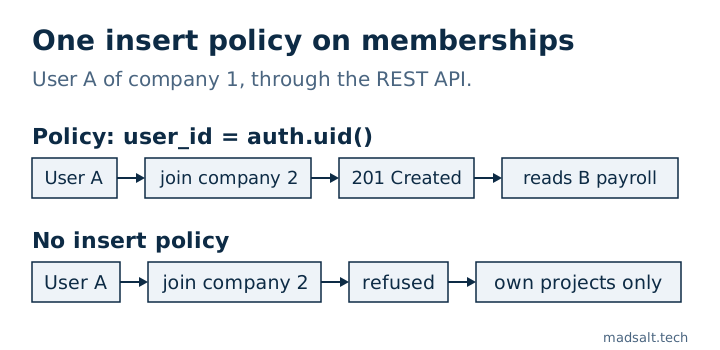
| Request by A | Status | Body |
|---|---|---|
| read projects | 200 |
A roadmap |
insert membership {user_id: A, org_id: 2} |
201 |
created |
| read projects again | 200 |
A roadmap, B payroll |
The fix is to give memberships no insert policy at all, so the browser cannot write to it (on the Postgres run the same insert was then refused with 42501), and add members through an invite flow that runs on the server or in a function that checks the invite. A user who belongs to two companies is the next trap; I wrote that one up in why a user in two orgs leaks data.
What if a policy needs to read its own table?
“Members can see their teammates” means a policy on memberships that reads memberships. Postgres refuses at query time:
ERROR 42P17: infinite recursion detected in policy for relation "members2"
Move the lookup into a function that runs as its owner, in a schema the API does not expose, with a fixed search_path:
create schema private;
create function private.user_org_ids() returns setof int
  language sql stable security definer set search_path = ''
  as $$ select org_id from public.members2 where user_id = (select auth.uid()) $$;
revoke all on function private.user_org_ids() from public;
grant usage on schema private to authenticated;
grant execute on function private.user_org_ids() to authenticated;

create policy "see teammates" on public.members2
  for select to authenticated using (org_id in (select private.user_org_ids()));
After that, A saw both members of company 1 and B saw only themself. Keep the function out of public: anything there is callable through the API.
How do you require MFA for sensitive rows?
Add a restrictive policy on top of the normal one. Restrictive policies are combined with and, so both must pass:
create policy "mfa only" on public.payouts as restrictive
  for select to authenticated using ((select auth.jwt() ->> 'aal') = 'aal2');
With the same user, a session at aal1 read 0 payouts and a session at aal2 read 1.
Which tables should have RLS on and no policy?
Tables that only your server touches. RLS on with no policy denies everything to the browser roles: on the Postgres run the guest and A both read 0 rows, and A’s insert was refused with 42501. Leaving RLS off is the opposite. A table with RLS off and default grants, read with the publishable key and no sign-in:
| Request by guest | Status | Body |
|---|---|---|
GET /leads |
200 |
both rows |
DELETE /leads?id=gt.0 |
200 |
both rows, deleted |
That is what the Advisor warning “RLS disabled in public” is about.
Can one policy cover several commands?
Not with a list. for update, delete is a syntax error (42601: syntax error at or near ","), even though it still appears in published snippet collections. for all is valid and applies one using and one with check to every command, which is rarely what you want. An insert policy with using fails too: only WITH CHECK expression allowed for INSERT.
Do policies slow queries down?
They can. A policy expression runs for each row Postgres considers. I timed select * from big as user A on 200,000 rows owned by 1,000 users, A owning 200 (median of 7 runs, Postgres 17.10):
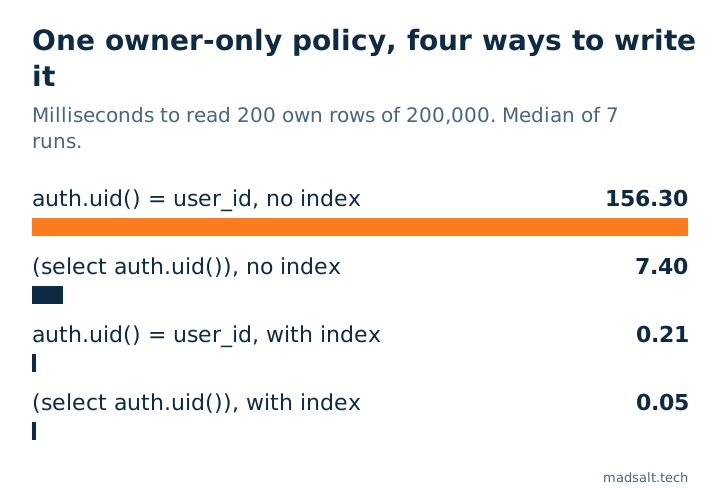
| Policy and index | Median time |
|---|---|
auth.uid() = user_id, no index |
156.3 ms |
(select auth.uid()) = user_id, no index |
7.4 ms |
auth.uid() = user_id, index on user_id |
0.21 ms |
(select auth.uid()) = user_id, index |
0.05 ms |
Wrapping the call in select lets Postgres compute it once per query instead of once per row; the index does the rest. Supabase’s RLS performance guide reports the same order of change on its own 100,000-row table (179 ms to 9 ms). Many blog posts quote those numbers as their own; the ones above are from my run.
Where should roles come from?
From app_metadata or your own table, never from user_metadata. A signed-in user can change their own user_metadata with supabase.auth.updateUser(), so a policy that checks auth.jwt() -> 'user_metadata' ->> 'role' lets them grant themselves the role. A sign-up trigger that copies a role from the sign-up metadata does the same; that case is in how a sign-up became Owner.
How do you check your own policies?
- The free Supabase security check reads your project read-only and flags policies that are always true, write policies for guests, policies that trust user metadata and tables with RLS off, with fix SQL for each.
- No scanner knows which rows belong to whom. For that, run requests as two users the way this article does; the full method for an app with roles is in how to test Supabase RLS.
- What Supabase secures for you and what it leaves to you is in is Supabase secure?.
- The same owner-only and team tests, run on Appwrite as well, are in Appwrite vs Supabase security.
Limits. One local stack and one laptop, made-up data, 24 October 2026. Timings depend on hardware and table shape; the ratios matter more than the milliseconds. Storage policies and Realtime are not covered here.