TL;DR
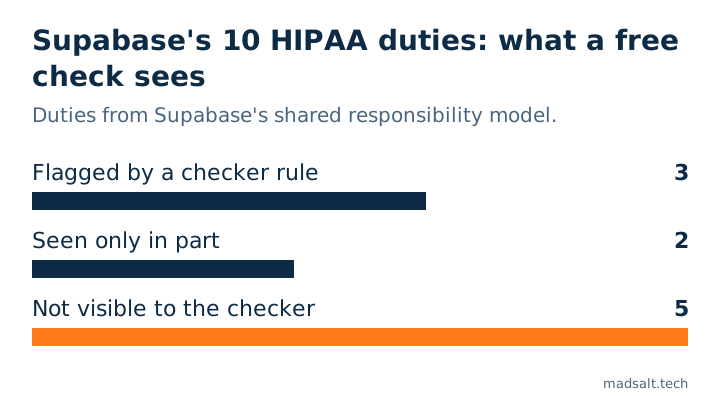
Yes, hosted Supabase can hold health data: it signs a Business Associate Agreement (BAA) on the Team plan and above, once the HIPAA add-on is on. Self-hosted Supabase is not covered. The BAA does not configure your project. Supabase’s shared responsibility model lists ten duties that stay with you, among them point-in-time recovery, SSL enforcement, network restrictions and Postgres connection logging. Of those ten, my free Supabase checker flags 3 directly, 2 only in part, and cannot see the other 5.
I’m Denys, a full-stack and AI engineer, and most apps I build or fix run on Supabase. When a health or wellness app asks whether it can use Supabase, the honest answer has two parts: what Supabase signs, and what you still have to switch on. This article takes them in that order, from Supabase’s own documents, read on 29 October 2026.
Is Supabase HIPAA compliant?
The hosted platform is. Supabase’s HIPAA compliance guide says it acts as a business associate for customers who handle Protected Health Information (PHI), has signed BAAs with its own vendors that can reach that data, such as AWS, and has its HIPAA controls audited every year in the same audit period as SOC 2. HIPAA projects also get every SOC 2 control the rest of the platform has.
Two limits come in the same guide. Self-hosted Supabase does not get these controls out of the box, and HIPAA compliance there is between you and your auditor. And the BAA covers Supabase’s part only: the guide lists your responsibilities as following the HIPAA Privacy, Security and Breach Notification Rules, signing the BAA, and configuring your HIPAA projects as the Security Advisor tells you.
What do you need before you store PHI?
From the HIPAA projects page and the shared responsibility model:
- A Team plan or higher. The BAA is not available below it.
- The HIPAA add-on and a signed BAA. You request both from Supabase; the add-on is enabled on the organization.
- High Compliance on each project. With the add-on on, a project can be marked High Compliance in General Project Settings. From then on Supabase runs extra checks on that project continuously, and a non-compliant setting shows up as a warning in the Security Advisor.
The Security Advisor warns; it does not fix. Supabase’s guide is direct about it: the responsibility for applying the recommended controls falls to the customer.
Which settings does a HIPAA project need?
Here is the full list from the shared responsibility model, with where each one lives and whether the free Supabase security check can see it. The checker reads a project through Supabase’s Management API after you sign in with Supabase, so it sees settings, not contracts.
| Your duty under the BAA | Where it lives | Free checker |
|---|---|---|
| Sign the BAA, Team plan or higher | Contract with Supabase | Cannot see |
| Mark projects HIPAA, fix advisor warnings | General Project Settings, Security Advisor | In part: shows every Security Advisor lint it receives |
| MFA on every Supabase account, enforced | Organization settings | Cannot see |
| Point-in-time recovery (PITR) | Database → Backups, needs a small compute add-on | In part: passes with daily backups alone |
| SSL enforcement | Database Settings → SSL Configuration | Flags it: “SSL not enforced on database connections” |
| Network restrictions | Database Settings → Network Restrictions | Flags it: “Database open to every IP address” |
| Postgres connection logging on | log_connections, off by default on new projects |
Cannot see |
| Encryption per the HIPAA Security Rule | Supabase encrypts at rest and in transit | Cannot see; application-level encryption is your choice |
| No PHI in public Storage buckets | Storage → bucket settings | Flags every public bucket; whether it holds PHI is for you to tell |
| No transfer to a non-HIPAA organization | Project transfer | Cannot see |
What does the free check miss?
Three gaps are worth spelling out, because a green result can read like more than it is.
Daily backups are not PITR. The checker’s backup rule passes when the project has point-in-time recovery or at least one backup. A paid project with daily backups and no PITR passes it. HIPAA projects need PITR specifically, so look at Database → Backups yourself; PITR needs at least the small compute add-on. What each plan keeps, and a restore test, is in Supabase backups.
Two different MFA settings. The checker’s “No multi-factor method enabled” is about your app’s users: whether Supabase Auth offers them a second factor. The HIPAA duty is about the people who can open your Supabase dashboard: MFA on every account in the organization, enforced as a requirement. You want both, and they are switched on in different places.
Connection logging. Supabase sets log_connections to off on new projects, and HIPAA projects should keep it on for the audit trail. The checker has no rule that reads it. In the SQL editor, show log_connections; answers it in one line, and the Security Advisor warns about it on a High Compliance project.
The checker shows every lint the Security Advisor returns, errors and warnings alike. I have not run it on a High Compliance project, so I cannot confirm that the HIPAA warnings arrive in that same list. Read them in the dashboard either way.
What HIPAA settings do not cover
None of the ten duties mentions Row Level Security. A HIPAA project with every setting above in place can still serve a patient table to anyone who has the public key, if that table has RLS off or a policy that allows every row. That is the part the checker does read in full: grants, policies, functions that bypass RLS and sensitive-looking columns readable by anonymous visitors. The difference between the two keys is in Supabase anon key vs service role key, and how I prove each permission against the API is in how to test Supabase RLS.
The same goes for everything outside Supabase. The shared responsibility model puts third-party services on you: SMTP and SMS providers, OAuth sign-in, and any external API an Edge Function or a database trigger calls. If one of them receives PHI, it is part of your HIPAA picture, not Supabase’s, so check whether each provider signs a BAA before data reaches it.
How do you check your project?
- In the dashboard, confirm the organization has the HIPAA add-on and the project is marked High Compliance, then open the Security Advisor and work through every warning.
- Open Database → Backups and confirm PITR is on, not only daily backups.
- Run
show log_connections;in the SQL editor. It should returnon. - In the organization settings, confirm every member has MFA and that MFA is required.
- Run the free Supabase security check for SSL, network restrictions, public buckets and the access rules above. My note on public buckets covers moving files to signed URLs.
For the wider question of what the platform guarantees and what it does not, see is Supabase secure?. This article is not legal advice; your compliance officer or auditor decides what your BAA and your HIPAA program require.
Building a health app on Supabase?
Happy to look at your project settings and compare notes. No pitch.
Get in touch