TL;DR
Lovable cannot move a Cloud project to your own Supabase in one step: you restore its database export, then move files, secrets and sign-in settings by hand. I repeated the export and restore on a local Supabase stack with a made-up app. A plain pg_restore reported 539 errors and still loaded every row, so it looked fine, but it gave the public anon role TRUNCATE on every table, lost the users’ sessions and the scheduled job, and left the sign-in settings at their defaults. Restore the structure from your migrations, then only the data, and run the checks below before you switch the app over.
I’m Denys, a full-stack and AI engineer. Most guides to leaving Lovable Cloud stop when the restore command finishes. This one starts there: what the new project looks like afterwards, and what you have to check before real users land on it.
I did not run this on Lovable’s servers. I built a small fictional SaaS on a local Supabase stack (CLI 2.109.1, Postgres 17.6): three tables with RLS and policies, a view, a SECURITY DEFINER function, explicit grants, a private bucket with two files, two users, a scheduled job, a Realtime table, stricter sign-in settings and one function secret. Then I exported it in the format Lovable documents for its export and restored it into a fresh project, twice.
Can you move a Lovable Cloud project to Supabase in one click?
No, not as of 6 November 2026. Lovable’s docs say it “does not transfer a project to another backend in one step”: you export the database, download the storage files, move the code with Git sync, and set up authentication, secrets, environment variables and external services again. Supabase’s own troubleshooting page agrees: there is no automated way to transfer a Lovable Cloud project to your Supabase account. The “claim your project” flow you may have read about belongs to Supabase’s platform offering for app builders; Lovable’s docs do not offer it for Cloud projects.
What is in the export, and what is not?
From the same docs: the export holds the full database, structure and data, including user accounts and their password hashes, so users keep their passwords. It does not hold files in storage, edge function code, secrets, sign-in provider settings or the project’s API keys. It is a compressed PostgreSQL archive for pg_restore, limited to databases up to 15 GB, a 5 GB file and one export every 24 hours.
My export of the test app, made with pg_dump -Fc --compress=zstd, was 333 KB and held far more than my three tables: Supabase’s own auth, storage, realtime, vault, extensions and other schemas came with it. That is what makes the simple restore noisy.
What happened when I restored it the simple way?
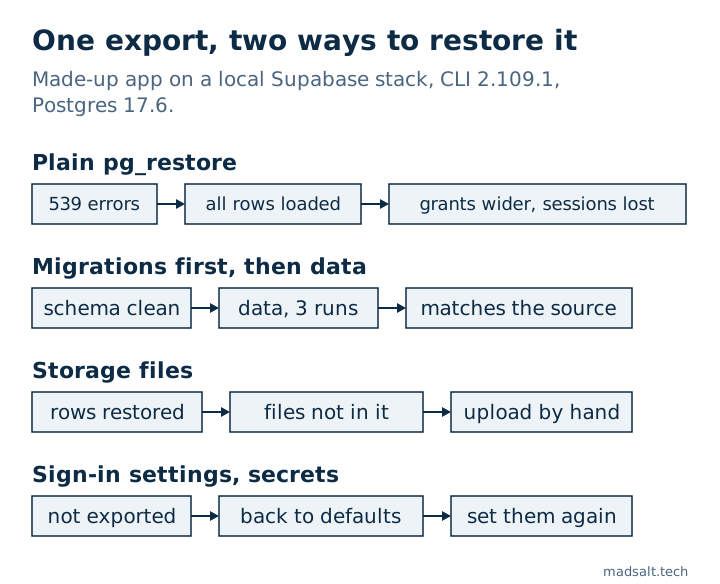
Into a fresh project, as the postgres user, with no options: pg_restore -d <database> export.dump. It finished with “errors ignored on restore: 539”. Most of them were about Supabase’s internal schemas: 91 × “grant options cannot be granted back to your own grantor”, 37 × “permission denied for schema auth”, 28 × “permission denied for schema storage”, and many “already exists”. Easy to dismiss, because the data was there:
| What | Source app | After the plain restore |
|---|---|---|
| Rows in companies / profiles / orders | 2 / 2 / 5 | 2 / 2 / 5 |
| Users, with password hashes | 2 | 2, and the old password still signs in |
| Tables with RLS on, policies | 3 on, 6 policies | 3 on, 6 policies |
View security_invoker, function settings |
set | unchanged |
Grants for anon |
none | TRUNCATE, REFERENCES, TRIGGER on all tables and the view |
Extra grants for authenticated |
none beyond select, insert, update | TRUNCATE, REFERENCES, TRIGGER |
| Sessions, identities, refresh tokens | 2 / 2 / 2 | 0 / 0 / 0 |
| Scheduled job | 1 | 0 |
| Files in the bucket | 2, both download | 2 rows, download fails with HTTP 500 |
Three of those rows matter more than the error count:
- Grants got wider. The source app had revoked everything from
anonand grantedauthenticatedonly what the policies need. The restored project gave both roles TRUNCATE, REFERENCES and TRIGGER on every table. As far as I can tell they came from the new project’s default privileges, and the export’s own grant statements were among the 539 errors, so nothing took them back. RLS does not cover TRUNCATE. I did not test whether anyone could use that through the Data API, but no client role needs it, and it is exactly what check 6 of my Lovable security checklist removes. - Everyone is signed out. The session, identity and refresh token rows failed on foreign keys, so an access token issued by the old project got HTTP 403
session_not_found. Users can sign in again with their old password, which worked in my run; Lovable’s docs warn about the sign-out too. Google or GitHub sign-in is the open question: theidentitiestable is what links such a login to the existing user, and it came back empty. - The files are rows without files.
storage.objectsdescribes each file, and the rows came across, but the files themselves are not in the export. On my local stack the download failed with HTTP 500. I only tested the local storage backend, so try a download on the new hosted project yourself, and expect it to fail until you upload the files.
Which restore worked?
The path Lovable’s guide points to: structure first, then data. On the second fresh project:
- Structure from your migrations. I applied my schema SQL, the equivalent of the
supabase/migrationsfolder that Lovable syncs to GitHub. It ran clean, with my grants, policies, view and function exactly as in the source. - Data only from the export.
pg_restore --data-only -d <database> export.dumpended with 17 errors. Most were again Supabase’s internal tables, which the new project already had. Five were not:identities,sessions,refresh_tokens,mfa_amr_claimsandone_time_tokensfailed on foreign keys, for exampleKey (user_id)=(…) is not present in table "users", because the data-only restore loaded them before their parent rows. - The failed tables again, parents first. Restoring
auth.identitiesandauth.sessionson their own loaded them; a third run withauth.refresh_tokensandauth.mfa_amr_claimsfinished with exit code 0. - The scheduled job by hand. Restoring the
crondata was denied (“permission denied for table job”), so I recreated the job withcron.schedule. Its run history does not come along.
I ran these inside the local database container; against a hosted project, $NEW_DB_URL is the connection string from the new project’s Connect dialog.
pg_restore --data-only -d "$NEW_DB_URL" export.dump
pg_restore --data-only -d "$NEW_DB_URL" -n auth -t identities -t sessions export.dump
pg_restore --data-only -d "$NEW_DB_URL" -n auth -t refresh_tokens -t mfa_amr_claims export.dump
After that, every check below matched the source: no table with RLS off, 4 public and 2 storage policies, the same grants table by table, the view still security_invoker, the function still SECURITY DEFINER with an empty search_path, the order id sequence at the right value, and 2 sessions, 2 identities and 2 refresh tokens.
One thing my run could not show: a new Supabase project made after 30 May 2026 no longer grants new tables to the Data API automatically. If your migrations create tables without a GRANT, the app gets error 42501 on the new project even though it worked on Lovable Cloud. The October 30 grant change explains the error and the fix.
What came back at its defaults?
Nothing in the export carries the project’s settings. On both paths:
| Setting | Source app | New project |
|---|---|---|
| Site URL | the app’s address | the default |
| Allowed redirect URLs | the app’s callback | the default |
| Email confirmation | on | off |
| Minimum password length | 10 | 6, a 7-character password was accepted |
| Function secret | set | missing |
Email confirmation off and a shorter minimum password are quiet downgrades: nothing breaks, sign-up just gets weaker. Set them again in Authentication before you switch, together with every sign-in provider and its redirect URL in the provider’s console.
What should you check before you switch?
Run these on the new project, and the same queries on the old one in Lovable’s SQL editor (More → Database → Manage), and compare.
- Row counts of your main tables, and
select count(*) from auth.users;. - RLS and policies. Tables with RLS off:
select relname from pg_class c join pg_namespace n on n.oid = c.relnamespace where n.nspname = 'public' and c.relkind = 'r' and not c.relrowsecurity;andselect count(*) from pg_policies;on both sides. - Grants, table by table:
select grantee, table_name, string_agg(privilege_type, ', ' order by privilege_type)
from information_schema.role_table_grants
where table_schema = 'public' and grantee in ('anon', 'authenticated')
group by grantee, table_name
order by table_name, grantee;
- Auth data.
select count(*) from auth.identities;must match the old project if anyone signs in with Google, GitHub or similar. - Scheduled jobs.
select jobname, schedule from cron.job; - Files. Download one file per bucket through the app, signed in as its owner.
- Sign-in. Sign in as a test user with the old password, then sign up a new user and check that the confirmation email and the password rule behave as before.
- Secrets and functions. Every secret your edge functions read is set, and every function is deployed.
Once the project is in your own Supabase account, the free Supabase security check can connect to it and run the configuration checks in one pass. The two-user test and the files are still yours to do by hand.
What does the move still need by hand?
- Storage files. Download each bucket from More → Storage in Lovable and upload the files into buckets with the same names, so the paths in
storage.objectspoint at real files. - Secrets. Not exported, so copy each one from Lovable’s Secrets into the new project’s edge function secrets.
- Edge functions. Deploy them from the
supabase/functionsfolder in your repository. - Sign-in providers and redirect URLs, in Supabase and in each provider’s console.
- The app’s connection. Point it at the new project’s URL and public key, and keep the old backend running until the new one has passed every check above.
If your app holds customers’ data, do the security checks on the new project before the switch, not after: a move is the moment grants and policies drift, as the plain restore showed. The full list is in my Lovable app security checklist.
My similar case
A company I built for was paying thousands of dollars a month for an enterprise document product. Its own platform now costs hundreds a month, with roles for documents, forms, reports and a client portal, and only the features the team uses. See the construction document platform case.
Moving off Lovable Cloud? Write to me and we’ll work out the move before something breaks.
Moving off Lovable Cloud?
Tell me what you have now and what you need. I'll reply with the option I'd pick.
Write to me