TL;DR
Time tracking software for small business splits in two: tools that bill client hours (Harvest, Toggl Track, Clockify) and tools that record when staff start and stop (Jibble, Connecteam, Deputy, TimeCamp). Free plans exist for both, from one seat on Harvest to unlimited users on Jibble. Paid plans run from USD 3.99 to 16 per user a month, and the price that decides your bill is usually the free-plan cap, the seat minimum or the add-on for leave and approvals. In the EU an employer must be able to record each worker’s daily working time, so a billable-hours timer alone may not be enough. If nothing fits, a small tracker built around your rules can be cheap to run.
I’m Denys, a full-stack and AI engineer. I build internal systems for small firms, including a time tracker one audit firm now uses for its weekly timesheets. This list is for the owner or office manager who has to choose the tool and pay for it. Prices were read from vendor pages and dated comparison sites in October and November 2026; check the vendor page on the day you buy.
What should time tracking software for small business do?
It should turn “I think we worked about 30 hours on that” into a number you can bill, pay or show. In practice that means five things:
- Timer and manual entry. Start and stop on a phone or computer, or fix a forgotten entry afterwards.
- Projects and clients. Every entry belongs to something you can report on.
- Timesheets and approval. A person or manager signs off the week before it is used.
- Leave and overtime. Absence and extra hours sit next to worked hours.
- Access rules. Who sees whose hours, and who can change them.
Billing tools do the first two well. Attendance tools do the last three. Decide which job you hire the tool for before you compare prices.
The 8 tools compared
There is no single best time tracking software for small business: the right pick depends on whether you bill clients by the hour or need a clock-in record for staff. Prices are per user a month in USD, billed yearly, unless stated.
| Tool | Best for | Free plan | Paid from |
|---|---|---|---|
| Clockify | cheapest billable time for a small team | up to 5 users | USD 3.99 Basic; USD 5.49 Standard |
| Toggl Track | the simplest timer, project reports | limited number of users | USD 9 Starter; USD 16 Premium |
| Harvest | time to invoice in one app | 1 seat, 2 projects | USD 9 Teams |
| TimeCamp | attendance plus billing | unlimited users | USD 3.99 Starter; USD 6.99 Premium |
| Jibble | clock-in for many staff | unlimited users | price not published on the pages I read |
| Hubstaff | remote teams | none | USD 4.99, 2-seat minimum |
| Connecteam | shift and field staff | up to 10 users | USD 29 a month for the first 30 users |
| Deputy (UK) | shifts and timesheets | none | GBP 3.25 Lite; GBP 4.25 Core |
Sources are in each entry: Clockify, Toggl, Harvest and TimeCamp figures are from their own pricing pages, the rest from comparison sites.
1. Clockify
The free plan covers up to 5 users, with unlimited tracking and projects, but no approvals or time off, and reports cover one month at a time, according to Adage Marketers. Standard is USD 5.49 per seat a month billed yearly (USD 6.99 monthly) and adds invoicing, approval, time off, attendance and overtime (Clockify pricing). Basic is USD 3.99 and Pro USD 7.99, according to Adage Marketers. Every active or invited user, including the owner, takes a paid seat.
2. Toggl Track
Toggl’s free plan is “for a limited number of users”; Starter is USD 9 and Premium USD 16 per user a month, with timesheet approvals and profitability reports on Premium (Toggl). Time off is a separate add-on at USD 2 per user a month and capacity management another USD 5 (same page). Third parties put the free cap at 3 users (actiTIME). The planner is for projects, not staff shifts (WorkWeekMath).
3. Harvest
Harvest is built around the path from hours to invoice. Free is one seat and two projects, with invoicing and expense tracking. Teams is USD 9 per seat a month billed yearly (USD 11 monthly), and Enterprise USD 14 (Harvest). Extra invoices, projects, clients and tasks are billed by use on top, so USD 9 is a floor (same page).
4. TimeCamp
Starter is USD 3.99 per user a month billed yearly (USD 5.49 monthly), Premium USD 6.99 and Ultimate USD 9.99, with attendance, time off and overtime tracking from Starter (TimeCamp). Its AI time suggestions are billed separately by token use (same page). A free plan with unlimited users exists, according to actiTIME.
5. Jibble
Jibble is the clock-in tool: its free plan is described as free forever for unlimited users, with GPS, geofencing and break and overtime tracking, according to WorkWeekMath. Paid plans (Premium, Ultimate) do not show a price on the pages one review read, and monthly paid plans have a minimum of 3 licences (Vaelolab). I could not read Jibble’s own price page, so ask for a quote.
6. Hubstaff
Hubstaff has no free plan. The entry price is USD 4.99 per seat a month billed yearly (USD 7 monthly), with a 2-seat minimum, and the top plan is USD 25, according to actiTIME. Check which monitoring features a plan switches on, and tell staff before you do.
7. Connecteam
Connecteam’s free plan covers up to 10 users with a GPS time clock and scheduling. The paid Basic plan is USD 29 a month for the first 30 users, billed yearly, in USD only (Vaelolab). It fits cafes, shops and field crews better than client billing.
8. Deputy (UK)
Deputy shows Lite at GBP 3.25, Core at GBP 4.25 and Pro at GBP 6.50 per user a month, excluding tax. Monthly plans carry a minimum of GBP 20 per invoice (Shiftbrook, reading deputy.com/gb/pricing). Built for shift work in retail and hospitality, so it is overkill for a two-person consultancy.
Which small business time tracking software is free?
Five tools have a free plan a small team can run on: Connecteam for up to 10 users, Jibble for unlimited users, Clockify for 5, Toggl Track for a few and Harvest for one person and two projects (Vaelolab). Small business time tracking software free of charge works best when you know what is missing: Clockify’s free plan has no approvals or time off, and Harvest’s has one seat. For a ten-person team that needs both approvals and leave, you are on a paid plan on every one of them.
What does it cost beyond the headline price?
The price page is rarely the bill. Four costs show up later:
- Add-ons. On Toggl, time off is USD 2 per user a month and capacity management USD 5 on top of the plan (Toggl).
- Usage fees. Harvest bills extra invoices, projects, clients and tasks by use (Harvest).
- Minimums. Deputy’s GBP 20 per monthly invoice, Hubstaff’s 2 seats and Jibble’s 3 licences on monthly plans, as above.
- Currency. A UK team on Clockify pays in US dollars, so the sterling cost moves with the exchange rate (BigRock).
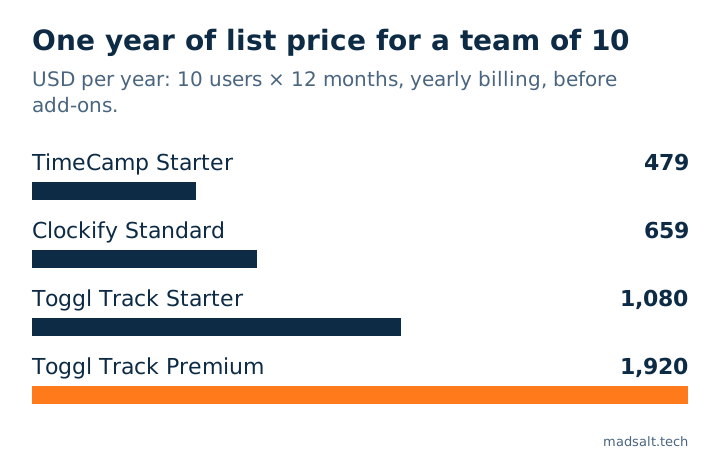
For ten people the arithmetic is price times ten times twelve. On published yearly prices that is about USD 479 on TimeCamp Starter, USD 659 on Clockify Standard, USD 1,080 on Toggl Starter and USD 1,920 on Toggl Premium, before add-ons.
Does an EU employer have to record working time?
Yes, with exceptions, and it changes which tool is enough. In May 2019 the Court of Justice of the EU ruled in case C-55/18 that Member States must require employers to set up “an objective, reliable and accessible system enabling the duration of time worked each day by each worker to be measured”. Each country decides the form, having regard to the sector and the size of the business (CJEU press release 61/19).
In Germany the Federal Labour Court held on 13 September 2022 (1 ABR 22/21) that employers must already record the start and end of daily working time under section 3(2) no. 1 of the Occupational Safety and Health Act (BAG press release 35/22). The decision says the record need not always be electronic, paper can be enough depending on the business, and the recording can be delegated to employees (BAG decision text).
What this means for the tool: a timer that records hours against projects does not by itself show start, end and breaks per day. If you employ staff in the EU, pick a tool with clock-in, breaks and overtime, such as the attendance features in Clockify Standard or TimeCamp, or a dedicated one. This is not legal advice, and national rules differ; I checked only the two rulings above and did not check whether Germany has since passed a statute.
When is a tracker of your own worth building?
When you pay per seat for features you use a third of, or you need a rule no product expresses: for example, confidential clients whose hours only named people can see, or a week that must be approved by several project leads. A custom tracker on a managed database has no per-user licence; the running cost is the database plan, and hosting and email often fit in free tiers. The cost moves to the build.
Buy first if you are under five people, your needs are a timer and a weekly report, or you need payroll or invoice integrations that already exist. For a firm-wide tool beyond time, see practice management software for accounting firms.
My similar case
I built a time tracker for an audit firm: hours against client, project and task, weekly timesheets with approval, reminders, and confidential clients visible only to named members. The firm logs about 70 entries a week. While building it I found four errors that no screen showed: report totals that would quietly come out too low, saves that said “saved” and saved nothing, a confidential client leaking through reports and counts, and a rejection hidden by a later approval. Each takes minutes to test for in any tool, bought or built; the full report is time tracking for audit firms: 4 silent errors. The build is in the audit firm time tracking case, and this kind of work falls under internal tools and dashboards.
If your team’s hours sit in a tool that fits half your work, write to me. We’ll look at what you track and what you pay for, and work out the best option for you, whether that is one of the tools above or a tracker of your own.
Paying for a time tracker that fits half your work?
Tell me what you track and what it costs. I'll say whether to switch, configure or build.
Write to meLimits of this list
- Prices are list prices read in October and November 2026 from vendor pages (Toggl, Clockify, Harvest, TimeCamp) and dated comparison sites (the rest), per user a month, mostly billed yearly. Jibble’s and Hubstaff’s own price pages did not load for me. Prices change often.
- Not tested hands-on. I compared published plans and scope; I did not run each tool with a real team.
- Free-plan caps differ by source. Toggl’s free cap is stated as “limited” on its own page and as 3 or 5 users elsewhere.
- The ten-person line is my multiplication of published yearly list prices, without add-ons, taxes or setup.
- Law. Two rulings, no statute check, no legal advice.