TL;DR
Time tracking for an audit firm is not about the timer. It is about two things: who can see which client’s hours, and whether the totals in the reports are true. Building a tracker for one audit firm, I found four errors that no screen showed: report totals that would quietly come out too low, about 30 actions that said “saved” when nothing was saved, a confidential client whose existence leaked through reports and tag counts, and a rejected entry that a later approval could hide. Each one takes minutes to test for in any tool, bought or built.
I’m Denys, a full-stack and AI engineer. Between May and October 2026 an audit firm moved from a tool where everyone could open every client to a tracker I built for it alone, over 388 commits. The firm is not named here. This piece is for the people who run a firm and choose its tools: what an audit firm needs from time tracking, the four errors I found, and how to check any tracker for them.
What does an audit firm need from time tracking?
An audit firm sells hours, so time tracking is the record the whole business stands on. The firm I built for needed:
- Hours against client, project and task. Every entry belongs to one engagement, so hours can be read by client, by project and by person.
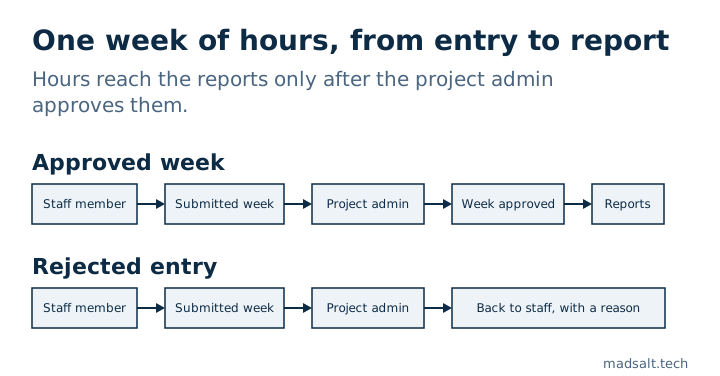
- Weekly timesheets with approval. Staff submit the week, the project admin approves or rejects each entry, and only approved hours count.
- Reminders. Anyone whose timesheet is still empty before the deadline gets an email. Since September 2026 it nags about missing hours only and skips people with zero capacity.
- Resource allocation. Who works on which engagement over the coming weeks, against each person’s capacity.
- Confidential clients. The owner can restrict a client, with its projects, tasks and time, to chosen members.
- Archive, never delete. A member who leaves is deactivated and anonymised, and a finished project is archived, so the timesheet history stays intact.
It does not issue invoices. Each project’s billing type and hour budgets sit behind their own permission, and invoicing stays in the firm’s accounting system.
Who should see whose hours in an audit firm?
Before this project, everyone in the firm could open every client and everyone’s hours. For an audit firm that is a confidentiality problem before it is a software problem: not every member should see every client, and nobody needs to see a colleague’s week unless they approve it.
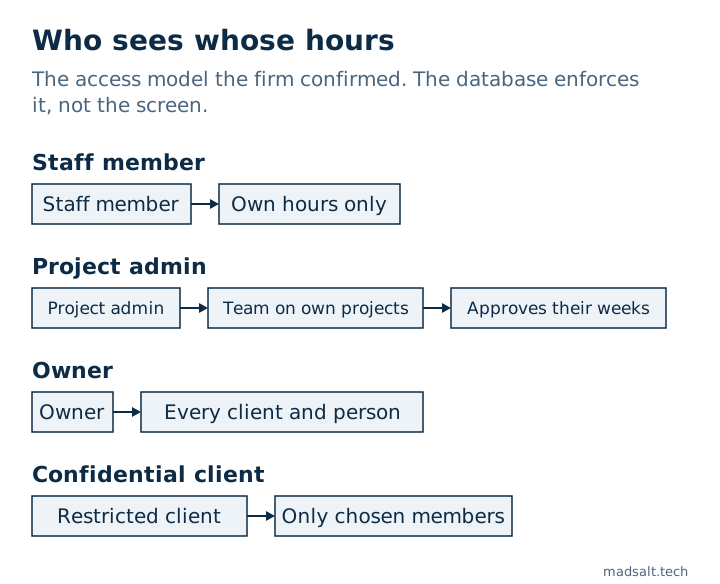
The access model the firm confirmed looks like this:
| Role | Sees | Can approve |
|---|---|---|
| Staff member | Own hours only | Nothing |
| Project admin | Hours of the team on their own projects | Their team’s weeks on those projects |
| Owner | Every client, project and person | Everything |
| Confidential client | Visible only to the members the owner chose for it | — |
The owner shapes each role in a matrix of checkboxes, area against action, and every rule lives in the database rather than in the screens, so a page cannot show what the database refuses. Each box was tested against a copy of production before release; how, and what that test found, is in how to test Supabase RLS.
One question the matrix could not answer came from the firm itself. In June 2026 a member with the most limited role saw other members and their projects on the allocation screen, and expected to see only themselves and one teammate. Should a restricted member see the people on their own projects? The rule we settled on: yes, on shared projects only, with other people’s capacity and time off hidden.
How do you get an access model a firm actually agrees with? I did not ask the client to describe it from memory. I sent a questionnaire of 72 questions in 9 sections, with the permission grids already ticked the way the live system worked on 7 August 2026. The client changed what was wrong, and every changed cell was flagged. People are better at correcting reality than at describing it.
Error 1: report totals would have come out too low
The Timesheets page has “This quarter” and “Year to date” views for the whole firm. They loaded every time entry in the range in one request. The database API behind the app returns at most 1,000 rows per request, and when it stops at 1,000 it does not raise an error. It just returns the first 1,000.
Supabase documents this default: projects return a maximum of 1,000 rows unless the limit is changed in the API settings.
So once the firm passed 1,000 entries in a range, members and weeks would drop out of the view, and the totals would come out too low with nothing on screen to say so. At about 70 entries a week, the year-to-date view was on course to pass 1,000 entries around mid-November 2026. A code audit on 24 September 2026 found it before it happened. The fix reads every range page by page, and every report export now pages the same way.
How to check your tool: pick a long range, export the raw entries, add them up yourself, and compare with the report total. If the two differ, the report is cutting rows.
Error 2: “Saved” when nothing was saved
When the database refuses a change because of a permission, or because a rule needs two-factor sign-in, it can answer “0 rows changed” without any error. About 30 places in the app that update or delete records read that answer as success and showed “saved”. The person moves on. The change never happened.
The fix is to fail closed: a write that touches no row is an error, shown as one, and a test now checks that every write path treats it that way.
How to check your tool: sign in as a member without the right to edit something, try to edit it, then reload the page. If you saw “saved” and the old value is back, the tool lies about saves.
Error 3: a confidential client leaked through reports
Some engagements are known only to the people working on them. Since 24 August 2026 the owner can restrict a client to named members. Everyone else gets nothing back for that client, its projects, tasks or time. The owner always has access, and that access is worked out from who holds the owner role today, not stored, so it moves when the role moves.
Hiding the client from the client list was the easy part. The leaks were in the side doors. A review on 8 September 2026 found that:
- three report functions ignored the restriction, because they run with rights that skip the normal access rules, so a confidential client’s hours could appear in reports;
- tag usage counts in the admin tag overview counted the confidential client’s projects and tasks, which gave away that the engagement existed and roughly how big it was;
- error messages told the difference: trying to change a real but hidden record returned “forbidden”, trying a made-up one returned “not found”, so anyone could probe whether a confidential client existed.
All three now apply the same check as the main tables, and a hidden record looks exactly like a missing one. Moving a project or entry out of a confidential client also needs the owner or a dedicated permission, and every such move is logged.
How to check your tool: restrict one client to a single person. Then, as someone else, run every report, look at every count and filter, search for the client’s name, and open a direct link to one of its projects. You should find no trace of it, including in the error message.
Error 4: a rejection could be hidden by a later approval
A week can have entries on several projects, so several people approve it. If one project admin rejected an entry and another approved their part later, the later approval could settle the whole week and mask the rejection. Moving entries between tasks or reopening a week could hide it the same way.
On 24 September 2026 the approval logic changed so that a week stays rejected while any rejected entry remains live, and a project admin can archive a rejected entry only if they rejected it themselves. A database probe now runs each of these cases, and every one must read PASS.
How to check your tool: use two approvers on one week. Reject one entry as the first, approve everything else as the second, and see what state the week ends in.
Buy or build time tracking for an audit firm?
Buy first. Toggl, BigTime, ZenWorkflow and similar tools already cover timers, weekly approvals and client billing, and you can start on one this week. A custom tracker makes sense when the firm has rules the products cannot express, for example confidential clients visible to named members only, approval by several project admins per week, or roles the owner wants to shape box by box.
Whichever way you go, the four checks above take an afternoon and tell you more than a feature list. Every product page says “granular permissions”. Few show what happens when you untick a box.
Limits of this report
- One firm. The access model, the volume of about 70 entries a week and the questionnaire are from a single firm.
- Error 1 was caught before it fired. The mid-November date is a projection from the firm’s entry rate, not a measured incident.
- No invoicing. The tracker holds hours, billing type and hour budgets but does not bill clients, so I cannot speak to time-to-invoice flows.
The access rules here are Postgres row-level security. Two holes a role matrix does not catch are written up separately: a user who belongs to two organisations and an IF that fails open on NULL. The build itself is in the audit firm time tracking case, and this kind of work falls under internal tools and dashboards.
Choosing or building a time tracker for your firm?
Happy to compare notes on access rules and approvals. No pitch.
Get in touch