TL;DR
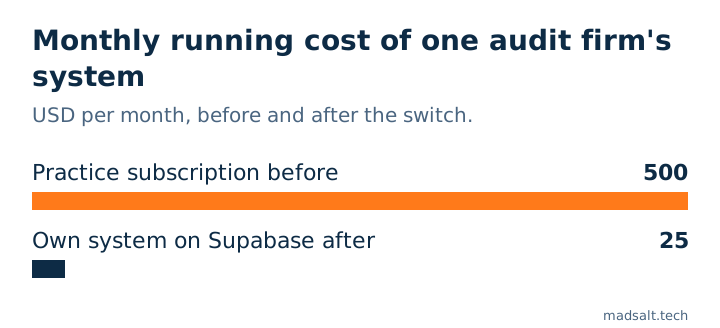
For most small and mid-size accounting firms the shortlist is Karbon, TaxDome, Canopy and Financial Cents in the US, and Senta, Capium and BrightManager in the UK. Prices run from about USD 19 to USD 109 per user per month, or per client for TaxDome and Capium. Pick by how you are billed (per seat or per client), whether the client portal is included, and whether you can hide one client’s work from staff who don’t serve that client. When none of them fits, a firm-specific system can cost far less to run: one audit firm I built for went from about USD 500 a month to USD 25.
I’m Denys, a full-stack and AI engineer. I build internal systems for small firms, including the one an audit firm now uses for its clients, engagements and hours. This list is for the partner or office manager who has to choose the tool and pay for it. Prices are from vendor pages read in November 2026; check them on the day you buy, because two vendors on this list changed their pricing model this year.
What should practice management software do for an accounting firm?
It should hold every client, engagement and deadline in one place, so nobody runs the firm from email and a spreadsheet. In practice that means five things:
- Client records (CRM). Contacts, entities, engagement letters and the history of every request.
- Workflow. Recurring jobs (monthly bookkeeping, VAT returns, year-end) with checklists, owners and due dates.
- Time and billing. Hours against each engagement, then invoices or work-in-progress.
- Client portal. One place for clients to upload documents, sign and pay, instead of email attachments.
- Access control. Who can see which client. For audit firms this is a confidentiality duty, not a nice-to-have.
Most firms need the first four on day one. The fifth is where the products differ most, and vendor pages say least about it.
The 8 tools compared
| Tool | Market | Best for | Price (Nov 2026) | Portal included |
|---|---|---|---|---|
| Karbon | US, UK, AU | email-heavy teams, collaboration | USD 59 / 89 per user/month, billed yearly | yes |
| TaxDome | US, global | tax practices, client portal | USD 1,500/year for the first 150 active clients | yes |
| Canopy | US | tax resolution, modular buying | USD 74 / 109 / 149 per user/month, billed yearly | yes |
| Financial Cents | US | small firms, simple workflow | USD 19 solo; USD 49 / 69 per user/month | yes |
| Ignition | US, UK, AU | proposals and billing automation | USD 39 to 399 per firm/month | proposals only |
| Senta (IRIS) | UK | workflow with AML and e-sign | GBP 29 per user/month, GBP 23.20 on a 12-month plan | yes |
| Capium | UK | all-in-one incl. accounts production | GBP 140 / 280 / 420 per month for 100 / 300 / 500 clients | yes |
| BrightManager | UK | onboarding and client chasing | GBP 42.63 or 57.85 per user/month | yes |
Audit workpaper tools (CaseWare, CCH Axcess, AuditFile) are a separate category: they hold the audit file itself, not the firm’s workflow. Only AuditFile publishes a price, USD 199 per user per month.
1. Karbon
Karbon is built around the shared inbox: an email becomes a piece of work with an owner and a due date. It suits firms where most requests arrive by email and several people touch each job. Team is USD 59 and Business USD 89 per user per month on a yearly plan; monthly billing (USD 79 / 99) is only for teams of four or more (Karbon pricing).
2. TaxDome
TaxDome is strongest on the client side: portal, mobile app, documents, e-signature and payments. On 4 November 2026 it moved from per-seat to per-client pricing: USD 1,500 a year covers the first 150 active clients with 20 seats, then USD 15 per extra client (Accounting Today). Cheap for a firm with many staff and few clients, expensive for a solo practitioner with hundreds.
3. Canopy
Canopy sells modules: CRM, documents, workflow, billing and a tax resolution add-on. The modular model lets you start small, but the per-user price grows with every module you add. Plans run USD 74 / 109 / 149 per user per month on a yearly plan.
4. Financial Cents
The simplest of the US tools: recurring jobs, checklists, a client portal and billing. Solo is USD 19 a month; Team and Scale are USD 49 and 69 per user per month on a yearly plan. A good first tool for a firm moving off spreadsheets.
5. Ignition
Ignition is not full practice management. It covers proposals, engagement letters and automatic billing, and many firms pair it with one of the tools above. It is priced per firm, not per user: from USD 39 a month for one user and 20 clients up to USD 399.
6. Senta (IRIS Elements)
Senta is a UK workflow and CRM tool with AML checks, e-signature and a client portal that clients use for free. GBP 29 per user per month month-to-month, GBP 23.20 on a 12-month plan, ex VAT (Senta). It does not file returns: Making Tax Digital and iXBRL filing need a separate IRIS product.
7. Capium
Capium bundles practice management with accounts production, tax and company secretarial work, and charges by client count with unlimited users: GBP 140, 280 or 420 a month for up to 100, 300 or 500 clients, on a 12-month contract (Capium pricing).
8. BrightManager
Formerly AccountancyManager: onboarding, automatic client chasing, workflow, time and billing. GBP 42.63 or 57.85 per user per month plus VAT, on a 12 or 24-month contract.
What do these tools cost beyond the headline price?
The listed price is rarely the bill. Four costs show up later:
- Modules you don’t use. In some suites the client portal, e-signature and staff management are each a separate product or add-on (Uku on Practice CS).
- Seats that grow with the team. Seasonal and junior staff each need a seat; TaxDome sells seasonal seats separately, and Karbon charges more per seat on monthly billing.
- Pricing models that change under you. TaxDome’s switch to per-client billing on 4 November 2026 made it cheaper for some firms and dearer for others overnight.
- Leaving. Exports are often partial, and some vendors keep the data only while you pay (Uku on Practice CS).
AccountingWEB’s advice for a stack review fits here: list every subscription, find the tools nobody opened last month, and find where the same client data is typed twice (AccountingWEB, 3 Nov 2026).
Can staff see clients they don’t work for?
In most of these tools, yes, unless you configure it carefully. Vendors describe roles (partner, manager, preparer, admin), not walls between clients. ICAEW reminded firms in July 2026 that the duty of confidentiality also covers sharing inside the firm, and that firms must “digitally restrict access” where clients compete with each other (ICAEW).
Before you buy, test it. Create a restricted client, give one colleague no access to it, and check search, reports, notification emails and exports from that colleague’s account. In the tracker I built for an audit firm, a confidential client leaked through report totals and tag counts long after the client list itself was hidden. That story is in time tracking for audit firms: 4 silent errors.
When is a custom system cheaper than a subscription?
When the firm pays per seat for a suite it uses a third of, or needs rules no product expresses. A custom system on a managed database has no per-user fee: the running cost is the database plan, while hosting and email often fit in free tiers. The cost moves to the build, so it pays off when the subscription is large and the firm’s way of working is stable.
Buy first if you are under five people, your workflow is standard, or you need tax filing inside the tool. Filing integrations (MTD, IRS e-file) are years of vendor work you should not rebuild.
See also: Time tracking software for small business: 8 compared.
My similar case: USD 500 a month down to USD 25
An audit firm I work with was paying about USD 500 a month for its client and time management subscription, and every member could still open every client. I built it a system of its own: clients, engagements, weekly timesheets with approval, reminders and confidential clients visible only to named members. It now runs on Supabase for USD 25 a month; everything else in the stack is on free tiers. The build is in the audit firm time tracking case, and this kind of work falls under internal tools and dashboards.
If your firm pays a few hundred a month for a tool that fits half your work, write to me. We’ll look at what you use, what you pay for, and work out the best option for you, whether that is one of the tools above or your own system.
Paying for a practice tool that fits half your work?
Tell me what you use and what it costs. I'll tell you whether to switch, configure or build.
Write to meLimits of this list
- Prices are from vendor pages and trade press read on 9 November 2026, net of VAT. Several vendors quote only on request (CCH, CaseWare, IRIS Practice Engine), so they are not ranked here.
- Not tested hands-on. I have not run a firm on each tool; the list compares published scope and price. The access test above is what I would run before buying any of them.
- One custom case. The USD 500 → 25 figure is one firm’s bill, not a promise for every firm.