TL;DR
Run credits pay for your published app: database, compute, network, storage, realtime and AI calls. The usual cause of a jump is something that never stops: a scheduled job every few seconds, a polling timer, a page that reloads itself. In one builder’s report a 5-second email job made an empty test project cost 1.86 credits a day while the real product cost 0.15. Open More → Usage, list your jobs with the SQL below, search the code for timers, and set a Cloud usage limit before the next surprise.
I’m Denys, a full-stack and AI engineer. When someone hands me a Lovable app, the bill is often the first question, before security. I have not paid a Lovable Cloud bill of my own, so the numbers here come from Lovable’s documentation, read on 6 November 2026, and from builders who published theirs.
What counts as a Run credit?
Lovable has one credit balance. Building and chatting appear as Build credits; everything your published app consumes appears as Run credits. From Lovable’s project usage docs:
| Category | What it pays for |
|---|---|
| Database | The database server (instance size, how long it stays awake, queries) and its storage |
| Compute | Code running behind the scenes: edge functions, payments, emails |
| Network | Data the app sends and receives: API responses, uploads, images |
| Storage | Files the app stores, even while the project is paused |
| Realtime | Live updates: chat messages, notifications, collaborative edits |
| AI | AI features inside your app, by model |
Free, Pro and Business each include a monthly Cloud grant of 20 credits, which Lovable calls a temporary offering, and a Pro credit costs USD 0.25 on the 100-credit tier. Twenty credits a month is about 0.67 a day. A project that stays under that costs nothing extra; one that stays awake all day usually does not.
What made Run credits jump in real projects?
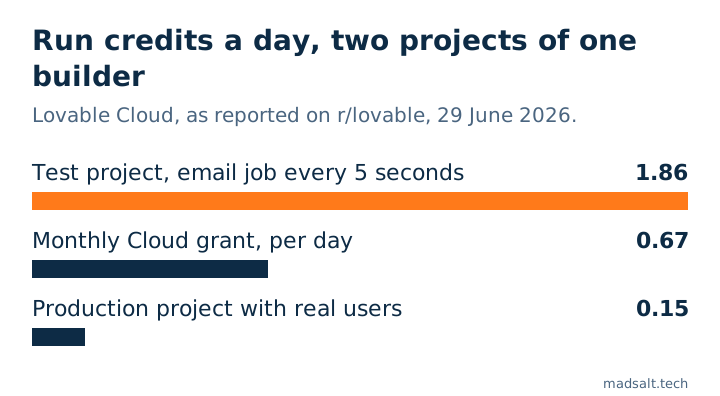
Three reports from r/lovable, each with the author’s own numbers:
- A 5-second email job. A builder had two projects on Lovable Cloud. The development project, with a tiny database and almost no traffic, used about 1.86 Run credits a day; the production project used 0.15. The cause, found with Lovable’s team, was a background email queue job that ran every 5 seconds and opened a database connection each time, even with nothing to send, so the database never went idle. At that rate the empty project would use about 56 credits a month, close to three times the monthly grant. (r/lovable, 29 June 2026)
- 95% database on day one. Another builder used 6.54 Run credits in the first 24 hours, 95% of it database, and went back to check their scheduled jobs. (r/lovable, 19 June 2026)
- A reload loop in one tab. A private app, one browser tab stuck in a reload and re-render loop, more than 3 million requests and 1 million database requests, and about USD 4,000 in charges in roughly two hours, by the author’s count. No traffic spike and no attack. (r/lovable, 9 June 2026)
The pattern is the same in all three: the cost did not come from users. It came from something that runs on its own and never stops.
How do you find what is burning credits?
Work from the cheapest check to the slowest.
- Open the Usage view. In the project, More → Usage, filter by Run credits. The breakdown below the chart is sorted by category. Database at the top on a quiet project points at something keeping it awake; Network or Compute at the top points at the app or a function calling too often.
- Ask Lovable. Lovable’s docs suggest asking in the project chat what drives the usage, and show an Optimize your usage button once a project has used more than 5 Run credits in 7 days. Treat the answer as a lead and confirm it with the checks below.
- List the scheduled jobs. More → Database → Manage → Jobs shows them, or run this in the SQL editor:
select jobid, jobname, schedule, active, left(command, 80) as command
from cron.job
order by jobid;
A schedule like 5 seconds or * * * * * (every minute) is the first suspect. To see how often each job actually ran in the last hour:
select j.jobname, count(*) as runs_last_hour
from cron.job_run_details d
join cron.job j using (jobid)
where d.start_time > now() - interval '1 hour'
group by j.jobname
order by runs_last_hour desc;
I ran all four queries in this list on a local Supabase stack (CLI 2.109.1, Postgres 17.6). A test job scheduled every 5 seconds had already run 17 times about 82 seconds after I created it, so a schedule in seconds is real and easy to miss.
- Find the queries that run most often. Supabase projects keep query statistics in
pg_stat_statements. The statement with millions of calls is usually the loop:
select calls, round(total_exec_time) as total_ms, left(query, 100) as query
from extensions.pg_stat_statements
order by calls desc
limit 10;
- Check what streams over Realtime. Every table in this publication sends changes to every subscribed client:
select schemaname, tablename
from pg_publication_tables
where pubname = 'supabase_realtime';
- Search the code. Sync the project to GitHub or download it, then search for timers and reloads:
grep -rnE "setInterval|refetchInterval|location\.reload|\.channel\(" src supabase
Which code patterns cost money?
| Pattern | Why it costs | Fix |
|---|---|---|
| A scheduled job every few seconds that checks a queue | The database never goes idle, so it is billed all day | Trigger the work when the row is written, or run the job every few minutes |
setInterval or refetchInterval that polls the database |
Every open tab sends a request every few seconds, all day | Use Realtime for changes, or poll only while the tab is visible |
A useEffect without a dependency list that fetches data |
It runs after every render, and a render can trigger the next fetch | Give it the dependencies it needs, and test with the network tab open |
location.reload() in an error or auth handler |
One failing request can reload the page forever | Show the error instead, and cap retries |
| A Realtime subscription to a whole table | Every change is sent to every subscriber | Filter the channel by user or company, and publish only the tables you need |
| An expensive call on page load (AI, an external API) | Each visitor and each refresh pays for it | Cache the result, or run it on a button press |
How do you put a ceiling on it?
On paid plans, workspace owners and admins can set limits under Workspace settings → Usage limits & alerts. A usage limit on Cloud credits can notify you or pause Cloud for the projects it covers, and a low-balance alert warns you before the workspace runs out (Lovable’s docs). Set an alert first, then a pausing limit at a level you would rather take the app offline than pay. A paused backend means a broken app, so the limit is a fuse, not a fix.
Three things that do not lower Run credits: writing fewer prompts (those are Build credits), a larger instance (it costs more per hour), and pausing a project that stores many files (storage keeps counting while paused).
What should you check after a fix?
Watch the Usage view for two or three days. A fixed job or loop shows up as a drop in the daily bar of the category you suspected; if it does not drop, the cause is somewhere else. If the project is a test copy nobody uses, pausing its database from More → Database → Manage → Settings is the simplest fix of all.
The same habit, checking what actually runs rather than what the code says, is the core of my Lovable app security checklist. If your app is slow as well as expensive, the queries from step 4 are where I start in a project rescue.
See also: How to reduce AI costs: 9 ways that work in 2026.
My similar case
My own work runs on cost controls like these: Claude or Codex orchestrates, free models on OpenRouter do the bulk of the work, and I change the effort level from task to task instead of leaving it high.
Credits or AI bills growing every month? Write to me with what you pay and we’ll work out where it can cost less.
Is your AI bill growing every month?
Tell me what you have now and what you need. I'll reply with the option I'd pick.
Write to me