TL;DR
Enable RLS in Supabase with one statement per table, alter table public.todos enable row level security;, or with the “Enable RLS” option in the dashboard. Tables made in the SQL editor or by a migration do not get it by default. Right after you enable it, the table goes quiet rather than loud. On my local test the public key, and two signed-in users, got 200 [] on select, update and delete, and only insert failed with 42501. The secret key still saw all 3 rows. A plain view over the table still handed all 3 rows to the public key. Since 30 October 2026 a new table also needs a grant before anything reaches it, so enable RLS and write the policies in the same migration as the grant.
I run a free Supabase security checker, and “RLS disabled” is the finding I see explained least well. Most guides say that after you enable RLS “the table becomes inaccessible”. That is true for reads and misleading for writes. So I built one table on a local Supabase stack and sent every kind of request to it, as the public key, as two signed-in users and as the secret key, after each step below.
What is RLS in Supabase?
RLS (row-level security) is a Postgres feature that filters rows per request. Supabase turns every request from supabase-js into a database query that runs as a role: anon for the public (anon, publishable) key, authenticated for a signed-in user. With RLS on, Postgres checks your policies for each row and returns, changes or deletes only the rows a policy allows. With RLS off, any role that has a grant on the table reaches every row.
The secret (service role) key is different. Its role has BYPASSRLS, so RLS never applies to it. That is why it belongs only on a server. The difference between the two keys is in anon key vs service role key.
How do you enable RLS in Supabase?
Three ways, depending on how the table was made:
- When you create a table in the Table Editor, keep “Enable Row Level Security (RLS)” checked. In Supabase’s dashboard source it is marked “Recommended”, and turning it off shows a warning that the table will be publicly readable and writable.
- For an existing table, Supabase’s API security guide says: go to Database, then Policies, and select “Enable RLS” on the table.
- In SQL, in the SQL editor or a migration:
alter table public.todos enable row level security;
Supabase’s guide is explicit that tables created in the dashboard have RLS on by default, and tables created in the SQL editor or through another tool do not. If you build your schema with migrations or an AI tool, check every table.
What happens right after you enable RLS?
Nothing errors except insert. I created public.todos with an owner column (user_id uuid default auth.uid()), granted it to the API roles the way older projects do, and added three rows: two owned by user A and one by user B. Then I enabled RLS with no policy:
| Request | Public key | User A | User B | Secret key |
|---|---|---|---|---|
| Select | 200, 0 rows | 200, 0 rows | 200, 0 rows | 200, 3 rows |
| Insert own row | 401, error 42501 | 403, error 42501 | 403, error 42501 | 201, row inserted |
| Update a row | 200, 0 rows | 200, 0 rows | 200, 0 rows | 200, 1 row |
| Delete a row | 200, 0 rows | 200, 0 rows | 200, 0 rows | 200, 1 row |
The insert error reads new row violates row-level security policy. Update and delete answer 200 with an empty array, so an app that does not check the returned rows reports “saved” when nothing was saved. Read your writes back after enabling RLS, or ask for a count with Prefer: count=exact.
Before RLS, with the same grants, the public key could read all 3 rows, insert, and update or delete any row. User A could edit and delete user B’s row and hand their own rows to B.
How do you make the table usable again?
Write a policy per operation. The usual own-rows set:
create policy "own select" on public.todos for select to authenticated
  using ((select auth.uid()) = user_id);
create policy "own insert" on public.todos for insert to authenticated
  with check ((select auth.uid()) = user_id);
create policy "own update" on public.todos for update to authenticated
  using ((select auth.uid()) = user_id) with check ((select auth.uid()) = user_id);
create policy "own delete" on public.todos for delete to authenticated
  using ((select auth.uid()) = user_id);
With these, user A saw their 2 rows and user B saw their 1. The public key still saw 0. When A tried to insert a row owned by B, or to move their own row to B, the answer was 403, 42501. That refusal comes from with check on update. When A tried to update or delete B’s row, the answer was 200, 0 rows. More patterns (public profiles, teams, MFA) are in Supabase RLS policy examples.
One detail from the secret key: a row it inserted got user_id = null, because auth.uid() has no user behind that key. RLS was skipped, but the default did not do what the column name suggests.
What did the public key read at each step?
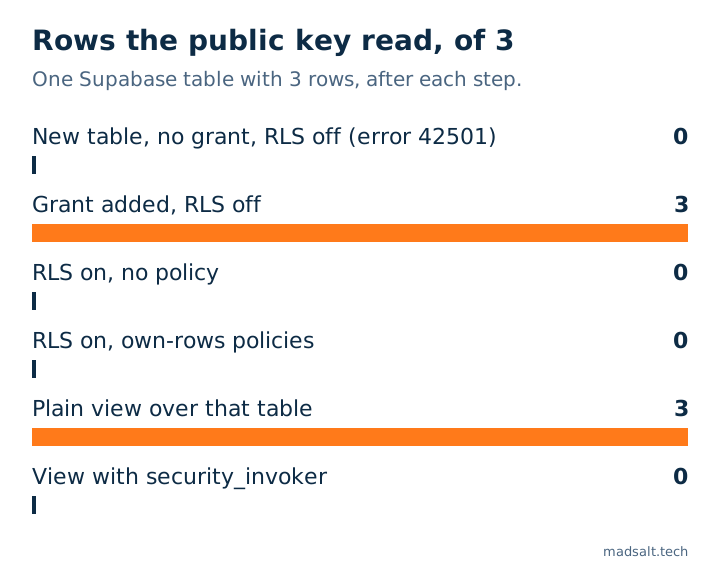
Two steps leak everything: a grant without RLS, and a plain view over a table with correct policies. The next two sections explain both.
Do you still need RLS after the October 30 grant change?
Yes. Since 30 October 2026, Supabase no longer gives new tables in public automatic grants for the API roles, on new and existing projects. My local stack already behaves that way. A freshly created table with RLS off answered 42501 to every role, including the secret key, so nothing leaked. The details are in the Supabase October 30 grant change.
But the grant comes back as soon as the app needs the table, and from then on RLS is the only thing between the public key and every row. So put all of it in one migration, in this order:
create table public.todos (...);
alter table public.todos enable row level security;
create policy "own select" on public.todos ...;
grant select, insert, update, delete on table public.todos to authenticated;
Grant only to the roles that need the table. When I revoked everything from anon, the public key’s select changed from 200 [] to 401, 42501. The grant is the first lock, RLS is the second.
Why does a view still leak rows?
Because a view runs with its owner’s rights, and in Supabase that is postgres, which bypasses RLS. With the own-rows policies in place on todos, a plain create view public.todos_view as select * from public.todos returned all 3 rows to the public key and to user B.
Recreated with (security_invoker = true), the same view returned 0 rows to the public key, 2 to A and 1 to B, exactly like the table:
create view public.todos_view with (security_invoker = true) as
  select * from public.todos;
Supabase’s Advisor flags the plain kind as security_definer_view; what it means and how to fix it is in the Supabase security definer view note.
How do you enable RLS on every new table automatically?
With an event trigger. Supabase’s event triggers guide gives a function rls_auto_enable() and a trigger ensure_rls that runs after create table, create table as and select into in public. I installed it as published and got:
- A table created afterwards with
create tablehad RLS on without anyalter. The public key got200 []on select and401on insert. - A table created with
create table as selectalso had RLS on. - A table created before the trigger stayed off. The trigger is not retroactive.
Without the trigger, a second table created next to the protected one had RLS off, and once granted, the public key read and wrote it freely. It also covers only public; other exposed schemas need their own line in the function.
Does FORCE ROW LEVEL SECURITY help?
Not for the roles you would worry about. alter table ... force row level security makes RLS apply to the table owner too. On Supabase both postgres and service_role have BYPASSRLS, so after force the owner still counted 3 rows, the secret key still saw everything, and a view owned by postgres still leaked. It only changed something for an owner role I created without BYPASSRLS: 2 rows before, 0 after.
How do you check your own project?
- In the SQL editor, list the tables in
publicwith RLS off:
select c.relname as table_name
from pg_class c
join pg_namespace n on n.oid = c.relnamespace
where n.nspname = 'public'
  and c.relkind in ('r', 'p')
  and not c.relrowsecurity
order by 1;
- The Advisor in the dashboard reports the same as
rls_disabled_in_public; what that error means is in the RLS disabled in public note. - The free Supabase security check reads your project read-only and lists tables with RLS off that the API can reach, views that bypass RLS and policies that allow everyone, with fix SQL for each.
- A scanner cannot know which rows belong to whom. To prove that, send requests as two users, as above. The full method for an app with roles is in how to test Supabase RLS.
How I tested
- Supabase CLI 2.109.1 on a laptop: Postgres 17.6, PostgREST 14.14, Auth 2.192.0. Two users signed in with a password, plus the local publishable and secret keys.
- One table,
public.todos, reseeded to the same 3 rows before every request. Each step was applied as SQL, and each request went over the REST API, with its status code and body recorded. - Grants for steps 2 to 5 were added by hand, to match a project created before 30 October 2026.
Limits. One local stack, made-up data, 28 October 2026. The dashboard steps are quoted from Supabase’s docs, not clicked through. Tables created by the dashboard’s own role may get different default grants. I did not test that, or Storage, Realtime or GraphQL.