TL;DR
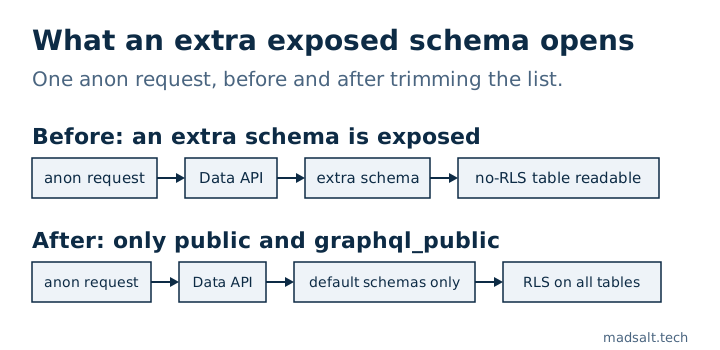
The Exposed schemas list in Supabase decides which schemas the Data API serves to anyone holding your public key. The default is public and graphql_public. Every table, view and function in a schema on that list must have its own grants and RLS, so each extra schema is more surface to defend. Keep the list short and check it first.
I built a free Supabase security checker, and the Exposed schemas list is one of the first things it reads. When someone asks how secure a Supabase project is, this setting is where I start.
What does “exposed” mean in Supabase?
Supabase serves your database over REST with PostgREST. PostgREST only answers for the schemas in its db_schema list, which you edit in the Dashboard under Project Settings → Data API → Exposed schemas. On the project config I looked at, the value was public,graphql_public, and the Supabase custom schemas guide says public is exposed by default. A request for a schema outside the list is refused, and PostgREST never allows pg_catalog or information_schema in it.
Why does the list matter?
Everything inside an exposed schema is reachable with the public key: tables, views and functions. Supabase’s RLS guide is blunt about it: a table in an exposed schema without RLS is readable and writable by any role with a grant on it. A schema that is not on the list cannot be reached through the API at all.
So an extra schema is not a neutral change. Add storage or vault to the list and you have put internal tables within reach of the Data API. Add your own schema and every table in it needs the same care as public.
How does the checker grade it?
The check is called extra_exposed_schemas. Everything except public and graphql_public counts as extra, then:
- An internal Supabase schema in the list (
auth,storage,realtime,vault,extensionsand similar) is a fail, high severity. - Custom schemas only, for example
api, give a warning, medium severity. - No extras passes.
The same list drives other checks. Tables with RLS off, anon write grants, always-true policies, views without security_invoker and SECURITY DEFINER functions that anon can call are only reported for exposed schemas, because that is where the public key reaches them.
How do you use a custom schema safely?
A custom schema is a legitimate pattern: Supabase’s Securing your API guide describes a dedicated schema such as api as a way to make the exposed surface easier to identify and audit, with internal tables kept in schemas that are not exposed. Two steps make it work, and the custom schemas guide gives both: add the schema to Exposed schemas, then grant usage on it to anon, authenticated and service_role, plus privileges on its objects.
The guide’s example grants ALL on every table. I would not copy that line as it stands. The Securing your API guide says to grant each role the minimum it needs, and to enable RLS on every table you expose. Grants decide whether a role can touch a table, policies decide which rows.
One separate change: Supabase stops granting new public tables to the Data API automatically. It became the default for new projects from 30 May 2026 and will be applied to existing projects on 30 October 2026, and existing tables keep their grants. That is the grants layer. It does not change which schemas are on the list.
How do you check your own project?
Open Project Settings → Data API and read Exposed schemas. If it is more than public and graphql_public, ask what each extra schema is for.
Then list the tables in those schemas that have RLS off, and whether anon can already read them:
select n.nspname as schema,
       c.relname as "table",
       has_table_privilege('anon', c.oid, 'select') as anon_can_select
from pg_class c
join pg_namespace n on n.oid = c.relnamespace
where n.nspname in ('public', 'api')  -- your Exposed schemas
  and c.relkind in ('r', 'p')
  and not c.relrowsecurity
order by 1, 2;
I ran it on a throwaway Postgres 17 with an api schema holding one table with RLS and one without, plus a public table without RLS. It returned only the two without:
 schema | table  | anon_can_select
--------+--------+-----------------
 api    | orders | t
 public | logs   | t
Every row with anon_can_select true is a table anyone with your public key can read, until you enable RLS or revoke the grant. The query covers tables only. Views and functions need their own look, which is what my Lovable app security checklist walks through, and how I test Supabase RLS shows how to prove the policies work.