TL;DR
Leaked password protection makes Supabase Auth reject passwords that appear in the Have I Been Pwned breach corpus. It is available on the Pro plan and above. On 23 October 2026 that corpus held password123 2,266,543 times, and my local Supabase Auth, with default settings, accepted it at sign-up. It does not judge strength: Lovable2026! appeared 0 times. Turn it on where you can, and set a longer minimum length either way.
My free Supabase security checker reads a project’s Auth settings, and “Leaked password protection off” is one of its rules, next to “Short minimum password length”. This note explains what the setting actually checks, with numbers I pulled from the same service it uses.
What is leaked password protection in Supabase?
It is one of the password settings in your project’s Auth settings in the Dashboard. When it is on, Supabase Auth checks each new password against the Pwned Passwords service from Have I Been Pwned and rejects the ones found there. Supabase’s password security guide lists it with minimum length and required characters, and notes that it is available on the Pro plan and above.
The check never sends the password. Pwned Passwords uses a k-anonymity range query: the client hashes the password with SHA-1, sends only the first 5 characters of the hash, and compares the returned suffixes locally.
How often do common passwords appear in breaches?
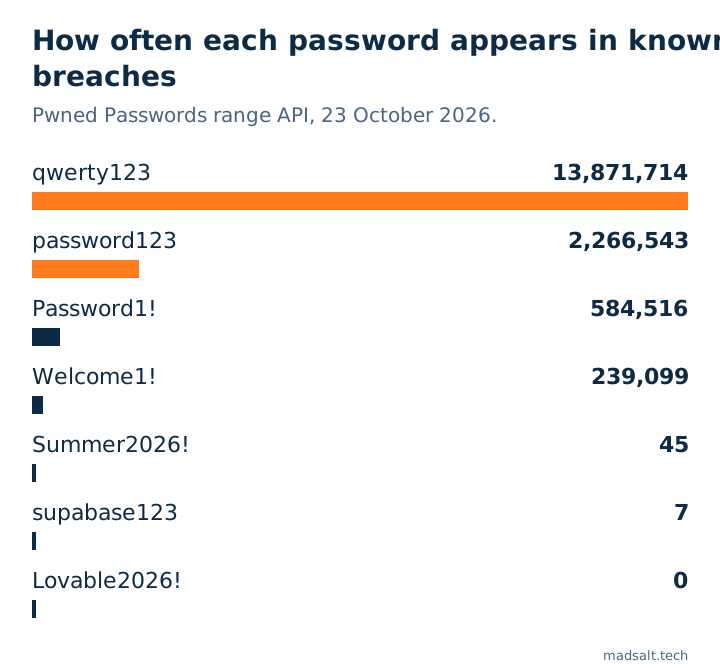
I ran that same range query myself on 23 October 2026, for a few passwords I see in test accounts and AI-generated seed data:
| Password | Times seen in breaches |
|---|---|
123456 |
210,461,208 |
qwerty123 |
13,871,714 |
password123 |
2,266,543 |
Password1! |
584,516 |
Welcome1! |
239,099 |
Summer2026! |
45 |
supabase123 |
7 |
Lovable2026! |
0 |
123456 is left out of the chart because it would flatten every other bar. The last three rows are the point: a password can be absent from every breach and still be easy to guess. Leaked password protection stops credential stuffing with known passwords. It does not measure strength.
What happens without it?
On a local Supabase stack (CLI 2.109.1, Auth v2.192.0) with default settings, I signed up a test user with password123. Auth answered 200 and created the user. The only thing it refused was a 5-character password, with 422 weak_password and the reason length, because the local default minimum is 6 characters.
So without the setting, nothing stands between a user and a password that has leaked millions of times, apart from the length rule.
What should you set?
- On Pro and above: turn on leaked password protection. Existing users keep signing in, and the guide says those whose password falls short of new requirements get a
WeakPasswordErrorthat explains why, so you can prompt them to change it. - On every plan: raise the minimum length. The guide calls anything under 8 characters not recommended; my checker’s rule suggests 12 or more.
- Require character classes only if your users can live with it; length does more than a required symbol.
- Add MFA for accounts that matter, and require the current password or a reauthentication nonce to change a password; both are in the same guide.
Leaked password protection is one of several Auth settings that only exist in the hosted project’s config, not in your repo. The rest of what I check on a Supabase app, from RLS to rate limits on sign-in, is in my Lovable app security checklist, and what Supabase covers versus what is yours is in is Supabase secure.